


s5.07.04 - introduction to sql and ddl
Master Data Definition Language (DDL) for A-Level Computer Science. Learn to define, create, and manage relational database schemas using SQL.
You've designed powerful databases and even tidied them up with normalisation. But how do you actually build one? Today, you're stepping into the shoes of a Database Administrator and learning the language computers use to create and manage their data structures. Get ready to speak SQL!
The Deep Dive
Building the Blueprint: Data Definition Language (DDL)
Today marks a pivotal step in your journey as Computer Scientists. We're moving from the abstract art of database design to the concrete engineering of building actual databases. This is where your Entity-Relationship Diagrams (ERDs) and normalisation skills truly come alive.
What is Data Definition Language (DDL)?
Imagine you're an architect designing a building. Before anyone can move in or even pour the concrete, you need a detailed blueprint showing where every wall, door, and window goes. In the world of databases, that blueprint is created using Data Definition Language, or DDL for short.
DDL is a subset of SQL (Structured Query Language) used specifically for defining, modifying, and deleting database structures. It's about describing the schema, which is the overall design of the database. Think of it as telling the database system: "Here are my tables, here are their columns, and here are the rules that govern how data can be stored in them."
The core DDL commands you'll encounter are:
CREATEALTERDROPThe CREATE TABLE
Command
CREATE TABLEThe most fundamental DDL command is
CREATE TABLE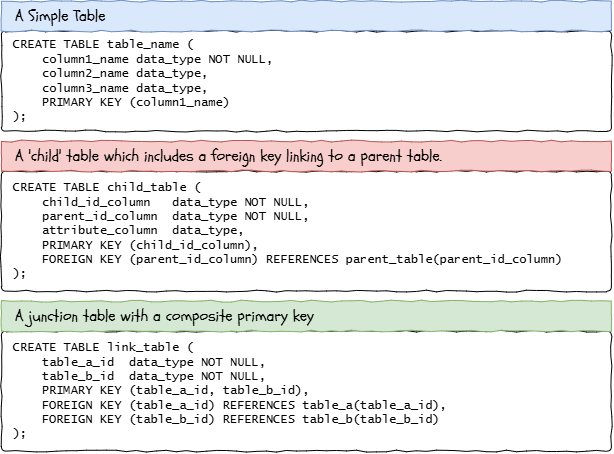
Examples of CREATE TABLE DDL Statements
Let's break down the key components:
1
Table Name
The name you give your table, e.g.,
CustomerProduct2
Column Names and Data Types
For each column, you specify its name and the type of data it will hold. This is crucial for efficient storage and data integrity.
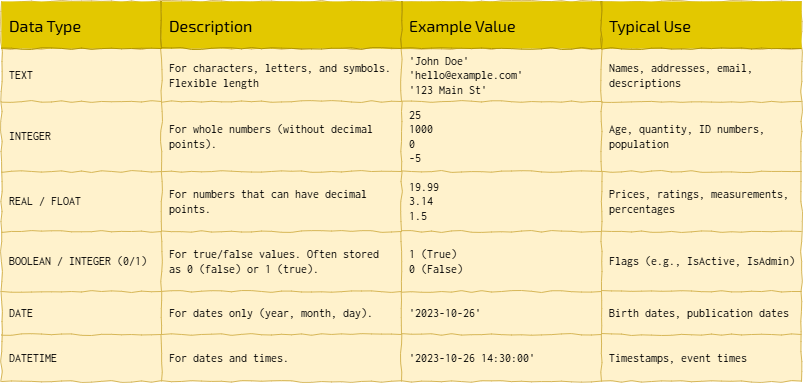
Common Data Types
Constraints: Enforcing the Rules
Constraints are vital rules that maintain the accuracy and reliability of the data within your database. They ensure that your database reflects the real-world rules you identified during normalisation.
1
Primary Key (PK)
This uniquely identifies each record in a table. It cannot contain
NULLPRIMARY KEYAUTOINCREMENTOrderID2
Foreign Key (FK)
This establishes a link between data in two tables. A foreign key in one table refers to a primary key in another table. It's how you enforce relationships and prevent orphaned records (e.g., a city existing without a corresponding country). You declare it using
FOREIGN KEY(column_name) REFERENCES other_table(other_pk_column)3
UNIQUE
Ensures that all values in a column are different. Unlike a primary key, a table can have multiple unique keys, and they can sometimes accept
NULLCustomers4
NOT NULL
Ensures that a column cannot have a
NULLNULLWhy are DDL Commands so Important?
For Software Developers and Database Administrators, understanding DDL is foundational. It allows you to:
Create Robust Systems: Build databases that inherently protect data quality and consistency, reducing errors and bugs in applications.
Communicate Design: SQL
CREATE TABLEManage Evolution: As systems grow,
ALTER TABLEToday, you'll be using
CREATE TABLE
Don't just accept the text. Write down three high-level 'Why' or 'What if' questions about these notes that aren't explicitly answered here. Use these to challenge your teacher or guide your independent study.
Comprehension Questions
Answer these questions on your lesson sheet.1
What is the primary purpose of Data Definition Language (DDL) in SQL?
2
List and briefly explain two core DDL commands.
3
When defining a table, what is the role of a
PRIMARY KEY4
Explain how a
FOREIGN KEY5
Give an example of when you would use the
UNIQUE
Task World Builder: Structuring the Planet!
Welcome, Master Architect! Your challenge today is to build the foundational structure of our 'World' database. Here is the blueprint - the ERD:
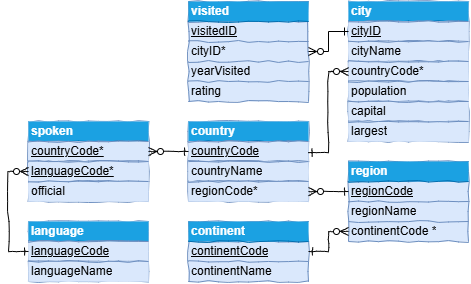
The World as an Entity Relationship Diagram
Relationship Reading
One city can be visited zero, one, or many times, whilst each visit record must be associated with exactly one city.
One country can contain zero, one, or many cities, whilst each city belongs to exactly one country.
One continent can contain zero, one, or many regions, whilst each region belongs to exactly one continent.
One country can have zero, one, or many languages spoken in it, whilst each entry in spoken relates to exactly one country.
One language can be spoken in zero, one, or many countries, whilst each entry in spoken relates to exactly one language.
0
Get Organised!
Open up The Computing Café SQLite Editor;
Organise your workspace;
Create a new database file called world.db.
1
Understand the Data Model
Refer to the ER diagram above. This diagram is your guide to how the tables should be linked.
Notice the different tables (
ContinentLanguageRegionCountryCitySpokenVisitedPay close attention to primary keys (PK), foreign keys (FK), and data types.
2
CREATE TABLE
For each of the following CREATE TABLE statements:
Switch to the SQL tab;
TYPE IN the CREATE TABLE statement, paying particular attention to the strict syntax;
Switch to the Schema tab and confirm the command executed successfully;
Clear the SQL tab ready for the next statement
1
Create the
ContinentThis is one of the 'parent' tables. They sit at the extreme of the data model and contain no foreign keys.
CREATE TABLE `Continent` (
  `ContinentCode` TEXT UNIQUE,
  `ContinentName` TEXT,
  PRIMARY KEY(`ContinentCode`)
);
2
Create the
LanguageAnother parent table.
CREATE TABLE `Language` (
  `LanguageCode` TEXT UNIQUE,
  `LanguageName` TEXT,
  PRIMARY KEY(`LanguageCode`)
);
3
Create the
RegionIn this child table. notice how it includes a
FOREIGN KEYContinentCREATE TABLE `Region` (
`RegionCode` TEXT UNIQUE,
`RegionName` TEXT,
`ContinentCode` TEXT,
PRIMARY KEY(`RegionCode`),
FOREIGN KEY(`ContinentCode`) REFERENCES `Continent`(`ContinentCode`)
);
4
Create the
CountryContinue with the
CountryFOREIGN KEYRegionCREATE TABLE `Country` (
`CountryCode` TEXT UNIQUE,
`CountryName` TEXT,
`Currency` TEXT,
`RegionCode` TEXT,
PRIMARY KEY(`CountryCode`),
FOREIGN KEY(`RegionCode`) REFERENCES `Region`(`RegionCode`)
);
5
Create the
CityThis table introduces an
AUTOINCREMENTCountryCREATE TABLE `City` (
`CityID` INTEGER PRIMARY KEY AUTOINCREMENT UNIQUE,
`CityName` TEXT,
`CountryCode` TEXT,
`Capital` INTEGER,
`Largest` INTEGER,
FOREIGN KEY(`CountryCode`) REFERENCES `Country`(`CountryCode`)
);
6
Create the
SpokenThis is a special table, often called a junction table or bridge table, used to resolve a many-to-many relationship between
CountryLanguageCOMPOSITE PRIMARY KEYCREATE TABLE `Spoken` (
`CountryCode` TEXT,
`LanguageCode` TEXT,
`Official` INTEGER,
PRIMARY KEY(`CountryCode`, `LanguageCode`),
FOREIGN KEY(`CountryCode`) REFERENCES `Country`(`CountryCode`),
FOREIGN KEY(`LanguageCode`) REFERENCES `Language`(`LanguageCode`)
);
7
Create the
VisitedFinally, create the
VisitedCREATE TABLE `Visited` (
`VisitedID` INTEGER PRIMARY KEY AUTOINCREMENT UNIQUE,
`CityID` INTEGER,
`YearVisited` TEXT,
`Rating` INTEGER,
FOREIGN KEY(`CityID`) REFERENCES `City`(`CityID`)
);
3
ALTER TABLE
We made a couple of deliberate errors in our initial schema design. We included a redundant `Currency` column in the `Country` table, and we forgot to include the `Population` column in our `City` table.
Execute the following statements one by one in the SQL tab to patch your database schema:
Drop the redundant column from the
CountryALTER TABLE `Country` DROP COLUMN `Currency`;
Add the missing column to the
CityALTER TABLE `City` ADD COLUMN `Population` INTEGER;
4
DROP TABLE
Sometimes, you need to completely remove a table and all of its structure from the schema. Let's create a temporary dummy table and then immediately delete it.
First, execute this command to create a mistake:
CREATE TABLE `Oops` (
  `DummyID` INTEGER PRIMARY KEY
);
Check the schema tab to see it has appeared. Now, completely remove it:
DROP TABLE `Oops`;
5
Export your (empty) database.
Click the export button and save a copy of
world.dbOutcome: A fully structured world.db database with all seven tables defined, ready for data manipulation.


Hungry for more?
Search the web: SQL DDL commands overview
Ask an AI: Click on the carefully written prompt below to learn more...

As an expert database architect, explain to a Key Stage 5 Computer Science student the difference between Data Definition Language (DDL) and Data Manipulation Language (DML) in SQL. Focus on their distinct purposes, key commands, and why both are essential for a complete database management system. Limit response to 150 words. NO intro, NO outro, NO deviation from the topic, NO follow-up questions.
Explore ALTER TABLE: Perform some extra research on the
ALTER TABLESticky Note Challenge
On a sticky note, write down the names of the two types of SQL commands you learned about today, and one key command for each type. Stick it on your lesson sheet!
Last modified: October 20th, 2026


