




lesson 2.4 - user demographics
Designing for everyone from toddlers to tech-savvy great-grandparents! Learn how age, beliefs, and culture shape the perfect user interface without making it awkward.

You've already done some brilliant work thinking about how a person's skill level (Novice to Expert) and accessibility needs (Visual, Motor, etc.) change how we design websites and apps. But even if two people have the same skill level and no disabilities, they'll still need very different designs! Why? Demographics! Today, we’re learning about the other key factors that influence design: Age, Culture, Beliefs, and Past Experiences. We'll explore why the design of a banking app needs to be different for a teenager versus a grandparent, or why certain colours and symbols in one country might be deeply offensive in another. Understanding this is what separates a globally successful product from a total disaster!
Get ready to become cross-cultural design experts!
Learning Outcomes
The Building Blocks (Factual Knowledge)
The Connections and Theories (Conceptual Knowledge)
The Skills and Methods (Procedural Knowledge)
Recall the demographic factors that influence user interface design: age, beliefs/values, culture, and past experiences.
Describe how the age of a user can impact the selection of text, images, and sound to make an interface interactive.
Describe why designing for beliefs/values is important for a cross-cultural user experience.
The Connections and Theories (Conceptual Knowledge)
Analyse how a user's culture can influence the meaning of symbols or colours within an interface.
Analyse how a user's past experiences with similar interfaces can lead to a less cluttered interface being more effective.
Evaluate the importance of considering user demographics when making fundamental design choices to ensure the interface is suitable for its target audience.
The Skills and Methods (Procedural Knowledge)
Apply demographic considerations to produce a design that meets the user accessibility needs.
Create a simple plan (e.g., in a written description or checklist) of how a product's interface should be adapted to suit a given demographic profile (e.g., a novice user who is elderly).
Evaluate the choices made in a design based on how effectively they cater to the different demographics of the intended audience.
Digital Skill Focus: Information Literacy: Critically Evaluating Online Sources - Learners will need to effectively use online resources (like usability guides, cultural design guides, or case studies) to critically evaluate how demographics impact design, rather than just accepting surface-level information.
User Demographics
Designing for the Real WorldDemographics are the characteristics of a population, and in design, they define who your user is, not just what they can physically or technically do. Understanding these factors is crucial for User Interface (UI) and User Experience (UX) design, ensuring your product isn't just functional, but also culturally and personally relevant.
The BTEC specification identifies four key demographic factors you must consider:
1
Age (C1.A2.3.1)
Age Group
Digital Literacy & Expectations
Design Considerations
Young Users (e.g., under 12)
High comfort with technology, expect engaging, visual, and fast interfaces.
Use of animation and sound to make the interface fun and interactive. Large, bold text and bright colours.
Adult Users (e.g., 25–55)
High but varied skill levels; value efficiency, organisation, and speed.
Clutter-free layouts. Use of common, consistent navigational components like search bars and standard menus.
Older Users (e.g., 65+)
May have lower digital literacy; may experience visual decline.
Large font size and simple, high-contrast colour palettes to improve readability. Clear, simple language and limited choices per screen.
2
Beliefs/Values (C1.A2.3.2)
A user's beliefs and personal values influence their interaction with content. A respectful design avoids causing offence or exclusion.
Example: A religious-themed social media app would need strict moderation to uphold the values of its users. Content should be filtered to ensure it is culturally and religiously sensitive.
Consideration: Designs must acknowledge that some content or imagery may violate a user's deeply held beliefs, which requires cross-cultural testing.
3
Culture (C1.A2.3.3)
Culture dictates how users interpret symbols, colours, and even the direction of text flow. What works in one country may fail completely in another.
Colour Perception: Colours carry strong cultural meaning. For example:
In Western cultures, white often symbolises purity. In many Asian cultures, it symbolises mourning or death.
Red can mean danger/error (globally) but also luck/celebration (in China).
Symbols and Icons: Hand gestures, animals, or religious symbols may be perfectly acceptable in one culture but highly offensive in another. Only use globally recognised, neutral symbols.
Text Direction: Languages like English read left-to-right (LTR), but languages like Arabic and Hebrew read right-to-left (RTL). Interfaces must be coded to flip the entire layout (including navigation) for RTL users.
4
Past Experiences (C1.A2.3.4)
A user's past experiences create a powerful set of expectations, or conventions, about how a system should look and function.
The Power of Convention: If a user has repeatedly used a standard feature (e.g., a magnifying glass icon for Search), they will expect all new interfaces to use it. Following these past experiences means reduced learning time and an increase in user confidence/familiarity.
Grouping of Information: A user who is familiar with Windows folder structures will expect file management tasks to be arranged logically, and a cluttered file system might cause them to feel confused or overwhelmed. The design should follow logical, predictable standards.
Example: Once users are familiar with a standard WIMP (Windows, Icons, Menus, Pointer) interface, a new piece of software with completely unfamiliar menus and icons will be frustrating, as their past experiences no longer apply.

Task Task The Demographic Design Challenge: The Majestic Cinema
In this task, you will firstly work together to generate ideas for two discrete personas for users of the 'Majestic Cinema' website and then work individually to produce a structured response/rationale for the design of one of the cinemas four screens.
1
Pair up and Create Contrasting Personas (15 mins):
With your partner, use the User Persona Template to create two highly contrasting user personas for the Majestic Cinema app:
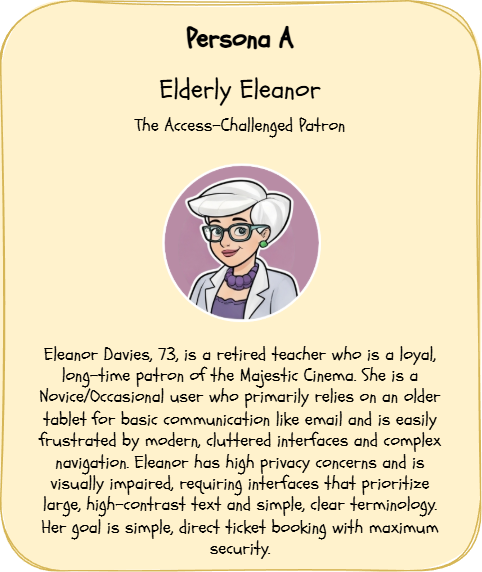
Click to focus
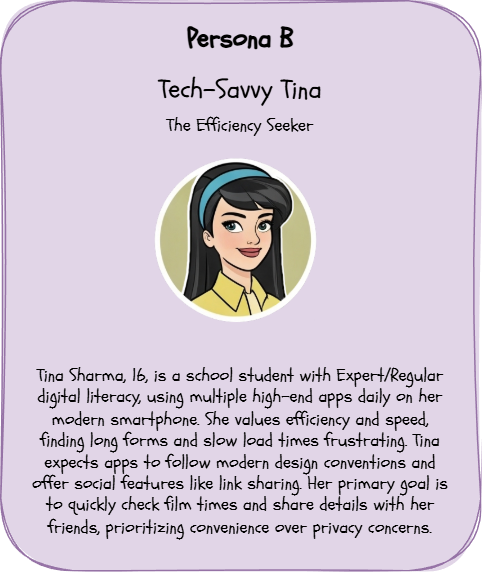
Click to focus
Ensure you complete the sections for...
Identity & Background (Who They Are)
Core Needs & Goals (What They Want)
Digital Literacy & Constraints (How They Interact)
Cultural & Ethical Context (Design Sensitivity)
Send a copy of your document to your partner, probably via email, so they can complete the next section themselves.
2
Individual Design Rationale (20 mins):
Work individually. Select one of the four core screens for the app:
Home
What’s On
Facilities
Ticket Booking
Write a structured response (minimum two paragraphs) that contrasts the design for Persona A with the design for Persona B, using the four demographic factors.
You must clearly explain how and why your design choices change for each persona.
Use these sentence starters in your written rationale:
"Considering the age of Persona A, the font size must be increased, unlike Persona B, whose high digital literacy means efficiency is prioritised over large text."
"The use of certain colours must be checked for cultural sensitivity. For instance, in Persona B's country, red symbolises [X] which would be misinterpreted by Persona A's culture."
"Persona A's limited past experiences with online payments dictates using a simplified, single-step input control for ticket booking to increase their user confidence."
3
Share a copy of your work with your teacher
Your teacher will tell you how to share a copy of your work with them.
Outcome: I have worked together with my partner to create a detailed User Persona Template for two contrasting users based on the Majestic Cinema scenario. I then wrote a clear design rationale that contrasts the needs of the two personas, explicitly linking design considerations (e.g., layout, font size, colours) to at least four demographic factors (Age, Culture, Beliefs/Values, and Past Experiences).


Application to the Component Sample PSA
The content of this lesson is directly applicable to Task 2: Interface Designs and Task 4: User Interface Review of the Component 1 PSA, based on The Majestic Cinema scenario.
Task 2 (Interface Designs): The brief states that the audience includes a diverse local community with varying age groups (adults, families, teenagers) and customers with specific accessibility needs. Applying today's learning means that when designing the four screens, learners must choose a layout, font size, and language that is appropriate for all these demographics, not just the youngest or most technically skilled. For example, a student must be able to justify why their Ticket Booking screen uses large, simple language suitable for an older, less tech-savvy audience (Age/Past Experience).
Task 4 (User Interface Review): The review requires the learner to evaluate the prototype against the user requirements and suggest improvements to better meet audience needs. A high-level response must explicitly evaluate the design against demographic factors. For instance, a learner could criticise a design that uses small, complex icons because the target audience includes customers with limited past experiences who need highly intuitive design. They would then suggest an improvement, such as replacing complex icons with clearly labelled items/features to increase user confidence/familiarity (A3.7.3) for that demographic.
Out of Lesson Learning
⭐ The Generation Gap
The Majestic Cinema aims to appeal to both teenagers and older patrons.
The Majestic Cinema aims to appeal to both teenagers and older patrons.
1
Identify two specific elements (e.g., an icon, a colour, or a feature name) on the "Facilities & Accessibility" screen that you would design differently for a 70-year-old patron (Age) compared to a 15-year-old student.
2
State one reason for each difference that relates directly to the older patron's typical past experiences.
⭐⭐ The Cultural Colour Swap
The Majestic Cinema wants to advertise a Bollywood film festival to appeal to a local culturally diverse community. They are considering using the colour Red on the poster for the app's "What's On" screen.
The Majestic Cinema wants to advertise a Bollywood film festival to appeal to a local culturally diverse community. They are considering using the colour Red on the poster for the app's "What's On" screen.
1
Explain why Red is a good choice for this event (linking to a potential positive cultural meaning).
2
Contrast this with a Western convention of using Red (C1.A3.6.2), and justify why the design team might have to use two different colours on the "Ticket Booking" confirmation screen to avoid ambiguity, regardless of the cultural context.
⭐⭐⭐ The Prioritised Persona
The project is running out of budget. The lead developer must choose to prioritise either the Teenager persona (who is tech-savvy but impatient) or the Elderly Patron persona (who is slow but careful).
The project is running out of budget. The lead developer must choose to prioritise either the Teenager persona (who is tech-savvy but impatient) or the Elderly Patron persona (who is slow but careful).
1
Argue which demographic the project manager should prioritise for the core functionality of the Ticket Booking screen to ensure commercial success for the cinema, explicitly drawing on the consequences of the other demographic's Age and Past Experiences.
2
Structure your argument: State your choice, give two detailed reasons (justifications) for your choice based on today's content, and then explain why compromising on the other demographic would be the lesser evil for the business.
Last modified: December 18th, 2025

















