




lesson 3.11.1 the problem with lists
A messy list causes chaos! Discover why single tables are a terrible idea for data.
Ever wondered how Netflix knows exactly which shows you've watched, or how the school keeps track of every student's attendance perfectly? It's not magic, it's all down to smart data organisation. Today, we're going to become Data Custodians and investigate a crime scene: a terribly organised database. We'll discover that just dumping everything into one big list, which seems easy at first, can lead to chaos, confusion, and catastrophic mistakes. Let's find out why!
Learning Outcomes
The Building Blocks (Factual Knowledge)
Describe what a flat-file database is.
Define the terms 'data redundancy' and 'data integrity'.
Identify three specific problems (anomalies) that occur in flat-file databases.
The Connections and Theories (Conceptual Knowledge)
Explain how storing data in a single list (a flat-file) leads to unnecessary duplication (data redundancy).
Analyse the relationship between data redundancy and a loss of data integrity.
Explain how update, insertion, and deletion anomalies compromise the accuracy and consistency of data over time.
The Skills and Methods (Procedural Outcomes)
Trace the journey of a piece of data through a simple system.
Identify points where data integrity could be compromised by human error in a flat-file system.
Distinguish between data, information and knowledge within a given scenario.
Digital Skill Focus: Today, you will be working with a paper-based spreadsheet, which will help you to understand how data is organised and the problems that can arise, a key skill in spreadsheet modelling and analysis.
The Appeal of the Single, Simple List
When we first think about storing data, the most obvious solution is to put everything into one big list, like a spreadsheet. This is called a flat-file database. It's a single table where all the information is kept.
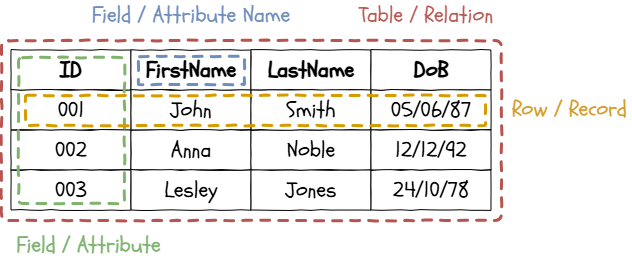
Terminology
For example, if a school wanted to track music lessons, they might create a single table like this to write down the details:
StudentID | StudentName | Instrument | TeacherName  | TeacherPhone
------------------------------------------------------------------
101       | Amy Smith   | Piano      | Mr. Jones    | 01234 567890
102       | Ben Lee     | Guitar     | Ms. Davis    | 01112 223344
103       | Chloe Green | Piano      | Mr. Jones    | 01234 567890
104       | David Chen  | Drums      | Mr. Patel    | 01555 443322
105       | Eva Rostova | Piano      | Mr. Jones    | 01234 567890
...       | ...         | ...        | ...          | ...
At first glance, this looks organised and easy to understand. But look closer. Can you see a major problem? The information for "Mr. Jones" is repeated every single time he is assigned a student. This repetition is called data redundancy, and it's the root cause of some very serious potential problems. It threatens our data integrity, which means the data is no longer accurate, consistent, and trustworthy.
Database operations
There are four operations that can be performed on a database:
Create: Add a completely new record to the database.
Read: Retrieve the contents of a record without changing it.
Update: Change the value of a field in a database.
Delete: Remove a complete record from the database.
Quite often, there are special rules which are applied to database tables. One of the most common one is 'not null' meaning that the field value can't be left blank.

Turn these words into pictures! Draw 3 small doodles, icons, or emojis that sum up the main ideas that you've read. You don't need to be an artist - making it visual helps your brain remember!

Task The Data Disaster
Your group are now the official 'Data Custodians' for a busy music school. Your most important job is to look after the master list of all lesson bookings, making sure it is always 100% accurate and trustworthy.
Your teacher has given you a large, paper copy of this master list. You must follow the verbal instructions from your teacher precisely to keep the data up to date. Use your pens to make the changes as neatly as you can.
Be warned: this task might be more complicated than it first appears! Discuss the problems you face as a group.
1
Get Organised!
Your teacher will give you an A3 copy of the 'Music Lesson Bookings' master record.
Make sure everyone in your group can see the sheet.
Have different coloured pens ready to make your changes.
2
Ch Ch Ch Ch Changes...
"Mr. Jones has a new phone number. It is now 07700 900123. Please update the table."
Did you update all 7 instances of Mr. Jones' phone number?
What would be the consequence of missing one?
What happens if there are two Mr. Jones's?
"A new teacher, Ms. Williams, has just joined the music department. She teaches the Violin. Please add her to our database."
What did you put for the student details?
You could have made up student details but why would that be wrong?
"Bad news. David Chen, our only drums student, has decided to quit. Please remove him from the list."
By deleting David, what do you also risk doing?
Why might this be a problem?
Outcome: You will have identified three major flaws in the flat-file database system and be able to explain why data redundancy is a serious problem.

The Three Disasters: A Summary of Anomalies
The problems you just experienced in the task have special names in Computer Science. They are known as data anomalies, and they are a clear sign that your database is badly designed.
1
The Update Anomaly
Condition: This happens when the same piece of information is stored in multiple records. In our task, Mr. Jones's phone number was repeated for every student he teaches.
Issue: To change this information, you must find and correct every single copy. If you miss even one, the data becomes inconsistent. The database now contains two different, conflicting 'facts', destroying its integrity. You can no longer trust which phone number is correct.
2
The Insertion (or Create) Anomaly
Condition: This occurs when you cannot add a new record to the table because you are missing data for some of the fields, and those fields cannot be left blank.
Issue: In our task, you couldn't add the new violin teacher, Ms. Williams, because you didn't have a student for her yet. A good database should never prevent you from adding valid new information, like a new teacher, just because another piece of related information doesn't exist yet.
3
The Deletion Anomaly
Condition: This is the most dangerous anomaly. It happens when a record contains facts about two different things, and deleting the record about one thing unintentionally deletes the only information you have about the other.
Issue: When you deleted David Chen, the only drums student, you also wiped out the only record of the drums teacher, Mr. Patel. The database has now lost all information about his existence. This accidental loss of data is a critical failure.
These three anomalies prove that storing everything in one big list is a recipe for disaster. In our next lesson, we'll learn the smart, professional way to fix this.
Become the Quiz Master! Write down three really tricky multiple-choice questions based on these notes. Make the wrong answers sound plausible to try and catch out your classmates.

Hungry for more?
Real-World Blunders: Research a real-world company data breach or system failure that was caused by poor data integrity or inconsistent data. What were the consequences?
Your Data Footprint: Look at the contacts list on your phone. Is it a flat-file database? Can you spot any examples of data redundancy (e.g., storing the same person twice with different details)?
Visual Learning: Watch a short video explaining database anomalies. Search for terms like "database anomalies explained simply" to see visual explanations of the concepts we covered today.

Out of Lesson Learning


Last modified: June 21st, 2026

















