




lesson 3.9.1 client-server vs peer-to-peer
Comparing Two Different Network Models
Ever wondered why your school computer feels so controlled, while sharing a file with a friend at home feels like a free-for-all? Today, we are stepping into the shoes of a Systems Architect. You will discover why big businesses like Spotify or your local Hospital choose massive central servers, while gamers and small startups often prefer the "equal power" of a Peer-to-Peer setup. By the end of this, you will be the expert deciding which tech heart a business should have!
Learning Outcomes
The Building Blocks (Factual Knowledge)
The Connections and Theories (Conceptual Knowledge)
The Skills and Methods (Procedural Outcomes)
Recall the definition of a "Server" and a "Client" within a network.
Describe the physical and logical layout of a Peer-to-Peer network.
Analyse the hardware requirements for both client-server and P2P models.
The Connections and Theories (Conceptual Knowledge)
Describe how centralisation impacts data security and backup procedures.
Analyse the advantages and disadvantages of having a "central point of failure".
Evaluate the suitability of different network models for specific business scenarios.
The Skills and Methods (Procedural Outcomes)
Apply knowledge of network models to recommend a solution for a client brief.
Create a justified comparison table between Client-Server and P2P architectures.
Digital Skill Focus: You will develop your digital productivity by using presentation software to professionally model and justify complex technical infrastructure choices.
The Architecture of Networks
In the world of networking, "Architecture" isn't about bricks—it is about power and control. There are two fundamental ways that individual computers on a network are related...
The Client-Server Model
Think of this like a Restaurant.
Think of this like a Restaurant.
The kitchen is the server. It holds all the "food" (files, webpages, emails) and provides "services" via the chef (authentication, printing, security).
The customers are the clients. They request things from the kitchen. They don't serve each other.
The Peer-to-Peer (P2P) Model
Think of this like a "Bring your own" dinner .
Think of this like a "Bring your own" dinner .
There is no central kitchen or chef. Everyone brings a dish and shares it directly with others.
Every person is an equal. Each one acts as both a client (accepting and eating food) and a server (giving food to others).
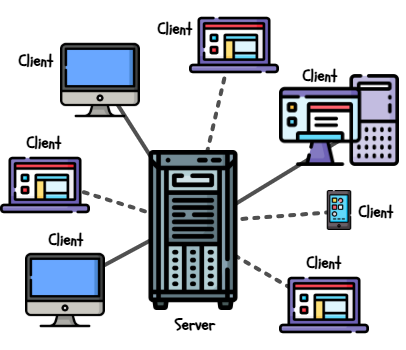
Client-Server Network
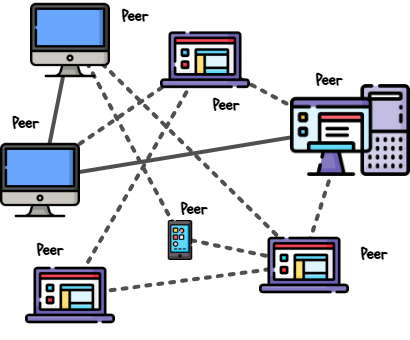
Peer-to-Peer Network
Pros: Everything is in one place. Stocktakes and security are easy, and security is tight because the "Chef" controls everything. The head chef overseas the whole operation.
Pros: It is cheap and easy to organise (though difficult to control). If one person leaves the party, the party stays active! If you want a bigger party with a wider selection of food, you just invite more people.
Cons: If the kitchen closes or the chef is off ill, nobody eats and the resteraunt might have to close! It's also expensive to hire a pro chef and buy industrial ovens. If you want to expand or change the menu you might have to do a full refit of the kitchen and hire a different cook.
Cons: It could be a logistical nightmare. You can't be sure who is "bringing what" to the party, and there is no central place to store the food, wash up etc - if everyone isn't careful, it'll end up a right mess!
Choosing the right model is vital for it support technicians. If you are running a massive bank, you need the control of a server. If you are a group of friends sharing photos in a room using Bluetooth, a peer-to-peer connection is much faster to set up.
The Architect's Cheat Sheet
To help you decide which network to build, use this comparison of the "Big Four" factors:
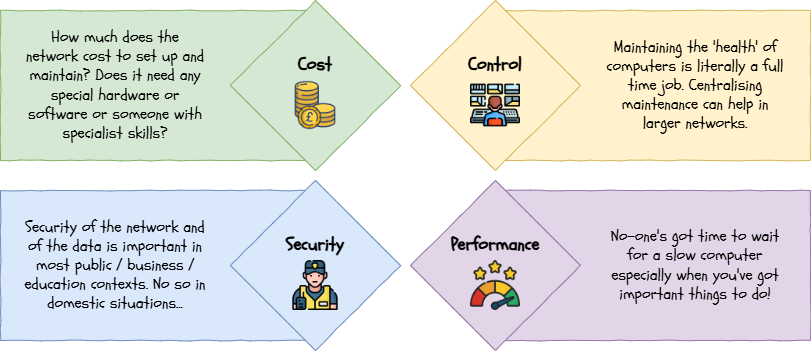

Task Be the Architect!
You have been hired as a Junior Network Consultant. Three very different clients need your help to set up their systems. If you get it wrong, their data might be stolen or their business might crash!
1
Get Organised!
Download the template.pptx file and save it to your computer.
Click the Enable Editing button on the yellow bar if it appears.
Each of the three slides has a scenario at the top and five boxes in the middle, three for your analysis, one for your recommendation and one for your justification.
2
Review the Clients
Read through these three client requests:
Client 1: The Primary School
"I run a primary school with 300 students. I need to make sure they can't access each other's files and I want to back up everything every night."
"I run a primary school with 300 students. I need to make sure they can't access each other's files and I want to back up everything every night."
Client 2: The Craft Business
"My sister and I have a small craft business at home. We have two laptops and one printer. We want to spend as little money as possible."
"My sister and I have a small craft business at home. We have two laptops and one printer. We want to spend as little money as possible."
Client 3: The Generous Gamers
"I am building a new app for gamers to share large video clips directly with each other without me having to pay for huge, expensive servers."
"I am building a new app for gamers to share large video clips directly with each other without me having to pay for huge, expensive servers."
3
Choose it!
Complete the sections on the template for each of the three clients. You need to think carefully about the client need for:
Cost
Control
Security
Performance
For each client, decide if they need a client-server or peer-to-peer network.
4
Justify It!
Write one sentence for each client in the last box justifying your choice.
5
Present it!
Your teacher will ask you to present each of the client slides one at a time so they, and your peers, can compare what you have decided to choose.
Outcome: Three accurate network recommendations with clear technical justifications.


Out of Lesson Learning


Last modified: February 25th, 2026

















