




lesson 3.9.4 protocols
Understanding Protocols as Agreed Sets of Rules
Imagine trying to play a complex board game with someone who speaks a completely different language and refuses to follow the same rules as you. It would be total chaos! Computers feel exactly the same way when they try to talk to each other over a network. To stop the chaos, they use Protocols - a set of strict, agreed-upon rules for communication.
Today, we are going to look at the most important rules on the internet: the ones that let your web browser fetch web pages safely. If you have ever thought about a career as a Cybersecurity Analyst, understanding how the famous "padlock" icon keeps your passwords safe is your very first step!
Learning Outcomes
The Building Blocks (Factual Knowledge)
The Connections and Theories (Conceptual Knowledge)
The Skills and Methods (Procedural Outcomes)
Recall the definition of a network protocol as a set of rules for communication.
Describe what the acronyms HTTP and HTTPS stand for.
Recall the visual indicators of a secure connection in a modern web browser.
The Connections and Theories (Conceptual Knowledge)
Analyse the difference between HTTP and HTTPS in terms of data encryption.
Evaluate why sending personal data over an HTTP connection is a security risk.
The Skills and Methods (Procedural Outcomes)
Apply your knowledge to inspect a website's digital certificate and find its expiry date.
Digital Skill Focus: Critically evaluate the reliability and security of online platforms by actively checking for HTTPS and valid certificates before entering any personal data.
What is a Protocol?
When two computers connect, they need to agree on how to talk. How fast should they speak? Who talks first? How do they know when the message is finished? A protocol is simply a set of rules that defines how data is formatted and transmitted across a network.
Just like humans have rules for writing a formal letter (putting the address at the top right, signing off at the bottom), computers have rules for sending files, streaming video, and loading web pages.
The Web Rules: HTTP and HTTPS
The most common protocol you use is HTTP (Hypertext Transfer Protocol). This is the rulebook that your web browser (like Chrome or Edge) uses to ask a web server for a webpage, and how the server sends the text and images back to you. However, standard HTTP has a massive flaw: it sends data as plain text. If you type a password into an HTTP website, anyone snooping on the network can read it! To fix this, we use HTTPS (Hypertext Transfer Protocol Secure). The "S" means the data is scrambled using encryption before it travels across the network. Even if a hacker intercepts the data, it will just look like random, unreadable gibberish.
The Padlock and Certificates
How do you know if a site uses HTTPS? Look for the little padlock icon or the settings icon next to the website address.
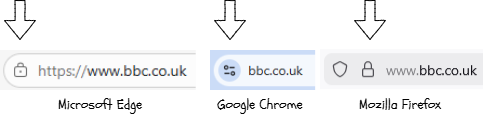
When you click that padlock, or the settings icon you are actually looking at the website's Server Certificate (also known as an SSL/TLS certificate). This is like a digital passport. It proves that the website is who it claims to be, and it provides the public "key" needed to encrypt your data.
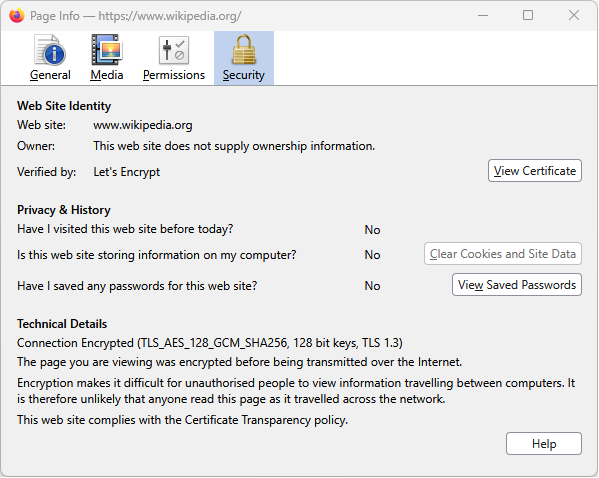

Task The Padlock Investigation
It is time to become a digital detective! You know that the padlock means a website is secure, but let's see exactly who is guaranteeing that security.
1
Get Organised!
Open a new tab in your web browser (like Google Chrome or Microsoft Edge).
Organise your workspace so you can see these instructions at the same time as the second tab.
Grab yourself a whiteboard and a pen to take notes.
2
Do some research
Like most things computational, it's unlikely you know everything (I know right!). Before you dive into the formal security investigation, perform some research firstly using a standard Google search and then using AI.
First, perform a standard Google search.
Now repeat the query using a carefully crafted AI prompt. Before you click it, read through it carefully.
Act as a supportive, expert computer science tutor. Explain how HTTPS encryption works using the padlock icon and the concept of digital certificates. Maximum of 64 words. Explain this so a 13-year-old KS3 student can understand. Keep the tone encouraging, clear, and avoiding overly academic jargon. Limit response to 2 short paragraphs. Include 1 real-world analogy. CRITICAL No intro, no outro, no deviation from topic, no follow-up questions.
What have you discovered from your two searches? Which one was more useful and why?
Write down your discoveries on your whiteboard.
3
Investigate your first target
1
Navigate to bbc.co.uk.
2
Look up at the address bar.
3
Click the small settings or padlock icon right next to the website address.
4
Click on "Connection is secure", and then click the little certificate icon or text that says "Certificate is valid".
4
Extract the data
A new window will pop up showing the website's digital passport! Read the information and write down the answers to these three questions on your whiteboard:
1
Who is the certificate "Issued to"?
2
Who is the certificate "Issued by" (the security company)?
3
What is the exact date that this certificate expires?
Write down your discoveries on your whiteboard.
5
Expand your search
Repeat steps 2 and 3 for three more websites:
Your own school's website.
This website.
Write down your discoveries on your whiteboard.
Outcome: A written record of the certificate details for three different websites, proving you know how to verify a site's security.


Out of Lesson Learning


Last modified: March 20th, 2026

















