




lesson 3.1.5 loops in python
Round and round again.

Imagine if you had to write "I will not talk in class" 100 times on a whiteboard. You’d get bored very quickly! Luckily, computers love doing boring, repetitive tasks. Today, you are going to learn the superpower of iteration. You will master the specific controls of the for loop to generate exact sequences of numbers, process text, and lists, before learning the while loop to build a game that can outsmart you! You are stepping into the shoes of a Software Developer or Automation Engineer where efficiency is everything.
Learning Outcomes
The Building Blocks (Factual Knowledge)
The Connections and Theories (Conceptual Knowledge)
The Skills and Methods (Procedural Outcomes)
Define the terms "definite iteration" and "indefinite iteration" in the context of Python programming.
Recall the three parameters of the range() function: start, stop, and step.
State the syntax for iterating over strings and lists.
The Connections and Theories (Conceptual Knowledge)
Distinguish between the outputs of range(5), range(1, 5), and range(1, 10, 2).
Explain how a loop variable changes value during each iteration of a cycle.
Predict the output of a loop that processes a list of items.
The Skills and Methods (Procedural Outcomes)
Apply the range() function to generate precise sequences, including countdowns.
Construct for loops to iterate through strings and lists to process data.
Create a while loop to build a robust "Number Guessing Game".
Digital Skill Focus: C.1.1 Core Skills - Develop touch-typing skills to improve speed and accuracy of syntax entry within an IDE
Why repeat yourself?
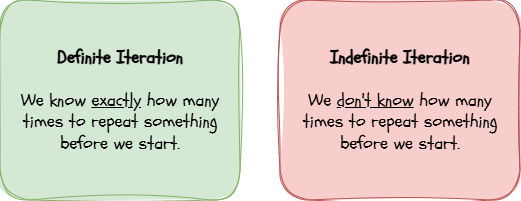
In programming, we follow a rule called DRY: Don't Repeat Yourself. If you copy and paste the same line of code five times, you are wasting time. Instead, we use loopsI have no idea what this means (also called iterationI have no idea what this means). There are two types of iteration:
The for
Loop
forUse a
forUsing the
range()range(stop)range(start,stop)range(start,stop,step)Using a string as the iterable.
Using a list as the iterable.

Task 1 PRIMM: The Range Rover and other iterables
As we've seen, there are a number of ways in which we can specify the iterable in a
for1
Get organised
Open up Thonny on your PC. If you haven't got Thonny available, ask your teacher to suggest a suitable IDE to use instead.
Organise your workspace!
2
The
range()Arguably the most straightforward iterator is the
range()forstop⭐ Easing you in: range(stop)
range(stop)🤔 Code Explainer
Line 1: Define the type of interaction (definite), declare the loop variable (
Line 2: Print a string "
iLine 2: Print a string "
This is loop number,iPredict the first number and the last number this code will print.
Run the script. Were you right?
Investigate the values printed on each line. What does stop value represent?
Here comes Thonny... Now copy the code and paste it into a new Thonny script. Make sure it's saved.
Modify the code so it prints the numbers 0 to 9. Change the message to say "Chapter " followed by each number.
Make a script containing a loop that prints the first 5 multiples of 3. Hint: calculate
i * 3Challenge
Ask the user to input a number
Ask the user to input a number
nnAdditionally, we can specify the
stop⭐⭐ Moving on: range(start,stop)
range(start,stop)🤔 Code Explainer
Line 1: Define the type of interaction (definite), declare the loop variable (
Line 2: Print a string "
iLine 2: Print a string "
i has the value: ,iPredict what will happen when you run the script. Will it print
9Run the script - was your prediction correct?
Investigate the values printed. What stop value would you specify if you wanted the last number to be
24Here comes Thonny... Now copy the code and paste it into a new Thonny script. Make sure it's saved.
Modify the loop to count from
1020Make a new script which prints the 6 times table but it MUST start with 1*6 = 6.
Challenge
Ask the user for a start number and a stop number, then run a loop between those two numbers.
Ask the user for a start number and a stop number, then run a loop between those two numbers.
The ultimate
range()startstopstep⭐⭐⭐ Ultimate control: range(start,stop,step)
range(start,stop,step)🤔 Code Explainer
Line 1: Define the type of interaction (definite), declare the loop variable (
Line 2: Print a string "
iLine 2: Print a string "
i has the value: ,iPredict what numbers will appear when you run the script.
46Run the script - was your prediction correct?
Investigate the values printed. Can you see which number prints last and why?
Here comes Thonny... Now copy the code and paste it into a new Thonny script. Make sure it's saved.
Modify the step to
5Make a new script which asks the user for the
startstopstepChallenge
Make a countdown timer by using a negative step value. Yes, that's possible! Try using this
Make a countdown timer by using a negative step value. Yes, that's possible! Try using this
range()range(10,0,-1)3
A string iterable
OK, so iterating through a list of numbers generated using the
range()🤔 Code Explainer
Line 1: Declare the variable
Line 2: Define the type of iteration (definite), declare the loop variable (
Line 3: Print out the current value of the loop variable,
wordHelloLine 2: Define the type of iteration (definite), declare the loop variable (
letterwordLine 3: Print out the current value of the loop variable,
letterPredict how the word
HelloRun the script - was your prediction correct?
Investigate the output. Are you happy that you know what has happened?
Here comes Thonny... Now copy the code and paste it into a new Thonny script. Make sure it's saved.
Modify the script so that it prints a different word.
Make a new script which asks the user for their name using the
input()print()Challenge
Can you make it print your name in UPPER CASE a letter at a time using the
Can you make it print your name in UPPER CASE a letter at a time using the
.upper()print(letter.upper())4
A list iterable
Lastly in the world of definite iteration we meet the list iterable. We'll learn more about lists in another module but for now, just recognise that they are a container for any values we want; integers, floats, characters, strings, Booleans or a combination thereof.
Firstly, a list of integers...
🤔 Code Explainer
Line 1: Define the type of loop, specify the loop variable (
Line 2: Print out the current value of the loop variable.
itemLine 2: Print out the current value of the loop variable.
Predict what will happen when you run the script.
Run the script - was your prediction correct?
Investigate the values printed. Do they make sense?
Here comes Thonny... Now copy the code and paste it into a new Thonny script. Make sure it's saved.
Modify the script to add a list of the number of days in each month of the year (not a leap year).
Make a new script which prints out the double of each number in the list. Hint: You will have to include
item*2print()Challenge
Type the following code into a new Thonny script and run it...
Can you figure out what's going on here?
Type the following code into a new Thonny script and run it...
for item in [77,97,103,105,99]:
    print(chr(item),end="")
Can you figure out what's going on here?
...and finally, a list of strings...
🤔 Code Explainer
Line 1: Define the type of loop, specify the loop variable (
Line 2: Print out the string
nameLine 2: Print out the string
HelloPredict what will happen when you run the script.
Run the script - was your prediction correct?
Investigate the values printed - do they make sense?
Here comes Thonny... Now copy the code and paste it into a new Thonny script. Make sure it's saved.
Modify the script by changing the list to one of your friends names.
Make a new script which contains a list of your favourite foods and prints out
I love [food]!Challenge
Write a script which takes this list...
...and prints it out as a sentence like this
Hint: You will have to use the the
Write a script which takes this list...
words = ["Welcome","to","Python","for","beginners!"]...and prints it out as a sentence like this
Welcome to Python for beginners!Hint: You will have to use the the
end=" "print()Outcome: I have predicted, run and modified Python code in a
for
The while
loop
whileSometimes we simply don't know how many times to loop! We want to keep going an indefinite number of times while a condition is
true🤔 Code Explainer
Line 1: Make sure the
Line 2: Define the loop as indefinite (
Line 3: Ask the user for their guess and store it in
Line 4: Only if the condition is false will this line run and print
answerLine 2: Define the loop as indefinite (
whileanswer != "Paris"trueLine 3: Ask the user for their guess and store it in
answerLine 4: Only if the condition is false will this line run and print
Correct!
Task 2 The Number Guessing Game
We will combine variablesI have no idea what this means, loopsI have no idea what this means (
whileifelse🤔 Code Explainer
Line 1: Import a special set of functions to create random numbers.
Line 2: Choose a random number between 1 and 20 and store it in the variable
Line 3: Make sure
Line 4: Print an introductory message.
Line 5: Define the loop as indefinite (
Line 6: Ask the user for their guess and convert it to an integer.
Line 7: If the guess is less than the secret number then run the next code block only.
Line 8: Print
Line 9: Else if the guess is greater than the secret number, run the next code block only.
Line 10: Print
Line 11: The guess must be correct - it's the only option left!
Line 12: Print
Line 2: Choose a random number between 1 and 20 and store it in the variable
secretLine 3: Make sure
guess0Line 4: Print an introductory message.
Line 5: Define the loop as indefinite (
whileguess != secrettrueLine 6: Ask the user for their guess and convert it to an integer.
Line 7: If the guess is less than the secret number then run the next code block only.
Line 8: Print
Too low!Line 9: Else if the guess is greater than the secret number, run the next code block only.
Line 10: Print
Too high!Line 11: The guess must be correct - it's the only option left!
Line 12: Print
You got it!Try these:
What is a MINIMUM number of guesses you would need to guess the number?
For the quiz that is written, what is the MAXIMUM number of guesses you would EVER need to guess the correct number?
Can you make the quiz harder by increasing the range of numbers that it choosen?
Outcome: I have combined iteration, selection, and variables to create a fully functioning interactive game.

Out of Lesson Learning


Last modified: September 14th, 2026

















