




machine learning
A quick lesson on the operation of machine learning and AI.
From Chatbots to Teachable AI
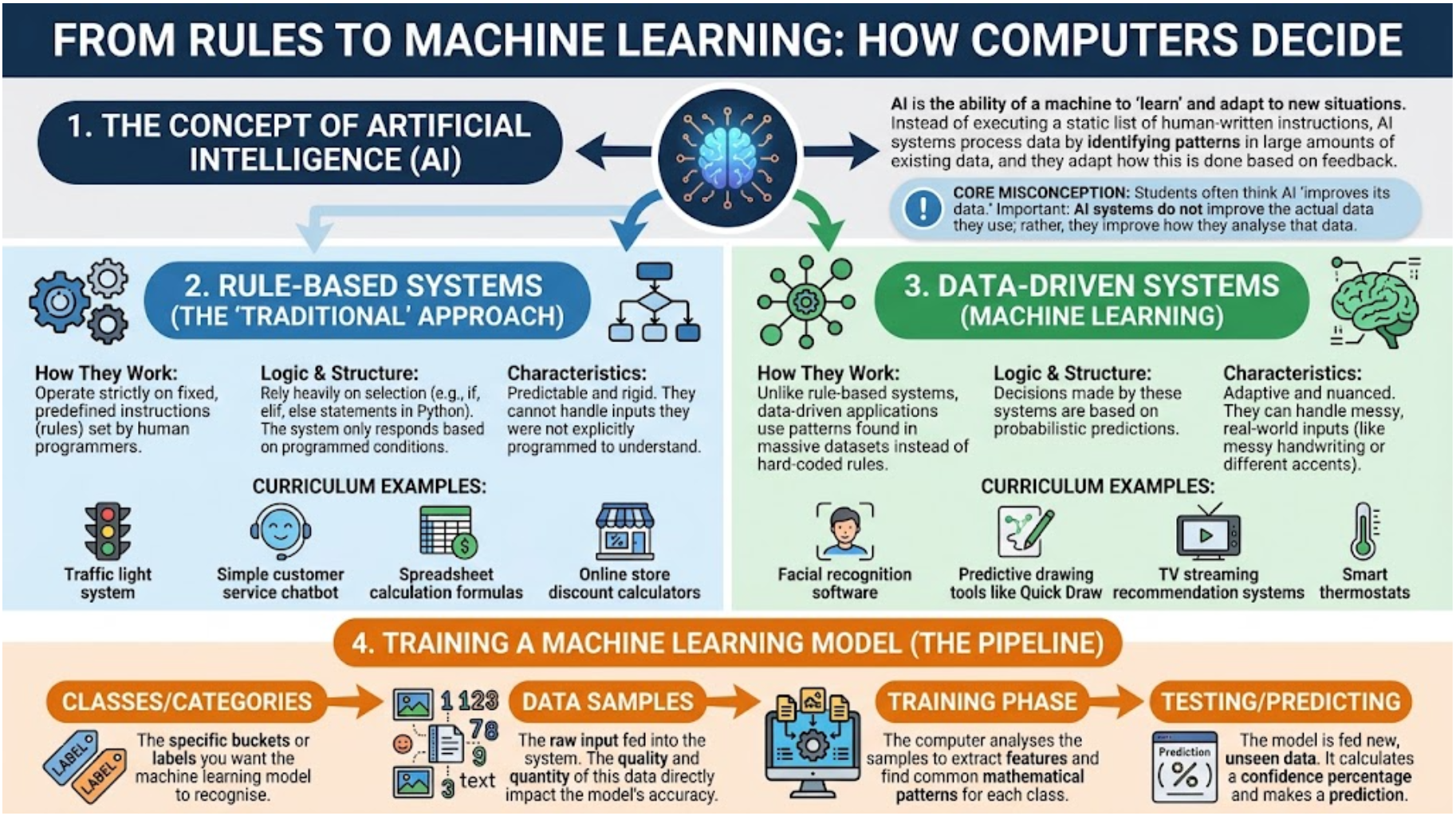
Today, we are going on a journey to see exactly how computers make decisions. We will start by looking at how human programmers write strict rules for computers to follow. Then, we will look at how artificial intelligence learns from data instead. Finally, you will step into the shoes of an AI engineer and train your very own machine learning model!
Learning Outcomes
Declarative Outcomes (Knowing That)
I can state the difference between a rule-based system and a data-driven system.
I can explain how AI uses large datasets to find patterns and make predictions.
I can describe the role of training data in machine learning.
Procedural Outcomes (Knowing How)
I can code, test, and modify a rule-based system using selection in Python.
I can interact with a pre-trained AI to analyse its predictive capabilities.
I can construct and train a custom machine learning model using data samples.
Task 1 The Rule-Based Chatbot
Traditional computer programs follow strict rules. They only know what we explicitly tell them using code. In this task, you are going to build a simple chatbot that responds to specific words using
ifelif1
AI Powered Research
First of all, let's ask Google AI to explain the difference between a rule based chatbot and an AI system. Click on the prompt to find out more.
Act as a computer science tutor. Explain the difference between a rule-based computer program and an AI system using a simple analogy, like baking a cake versus learning to cook. Limit the length of your response to 150 words. Target the reading level of a Key Stage 3 student. Ensure the tone is educational, encouraging, and free of complex academic jargon. Provide a strict structural comparison with a clear distinction between the two concepts, limited to exactly two paragraphs. NO intro, NO outro, NO deviation from the topic, NO follow-up questions.
2
Procedural Application
🌶️ Mild
Look at the starter code in the Python programming widget below. Click the run button and test what happens when you type "hello", "weather", and "pizza".
🌶️🌶️ Hot
Modify the code above to add two more
elif🌶️🌶️🌶️ Spicy
Use the empty Python widget below and create your own themed chatbot (e.g., a grumpy robot, a helpful shop assistant) with at least five different rules.
Use the
print
Task 2 The Pattern Detective (Quick Draw)
Writing a rule for every single thing in the world is impossible. Instead, we use Data-Driven AI. These systems process thousands of examples to find patterns.
1
AI Powered Research
Again, let's ask AI to explain it to us before we start...
Act as a computer science teacher. Explain how machine learning uses data to make predictions, using predictive text on a smartphone as an example. Limit the length of your response to 150 words. Target the reading level of a Year 9 student. Ensure the tone is educational, clear, and free of complex academic jargon. Provide a clear, structured explanation limited to exactly two paragraphs. NO intro, NO outro, NO deviation from the topic, NO follow-up questions.
2
Procedural Application
🌶️ Mild
Go to Quick Draw and play three rounds. Watch the guesses the AI makes at the bottom of the screen (you might have to accept the cookie warning to hide the banner).
🌶️🌶️ Hot
Did the AI get any of your drawings wrong? Can you explain why you think it struggled to predict your specific drawing? Tell your teacher or your shoulder partner.
🌶️🌶️🌶️ Spicy
Discuss with your shoulder partner why it would be nearly impossible to write a "rule-based" Python program (using if statements) to recognise a drawing of a cat.
Task 3 Train Your Own AI
Now you will train your own AI model without writing any code. The computer will look at the data samples you provide and figure out the patterns for itself!
Prerequisite Digital Skills: To complete the hot and spicy tasks, you will need to:
✅ Manage downloads in the browser;
✅ Extract files from zip archives;
✅ Search the internet for specific types of images (jpg) using advanced search;
✅ Right-click and save images to your local computer;
✅ Create logically named folders to organise your saved files;
1
AI Powered Research
Once again, asking an AI with a really structured prompt yields great results!
Act as a computer science teacher. Explain what a 'training dataset' is in machine learning, and why the size and variety of the dataset matter. Limit the length of your response to 100 words. Target the reading level of a Key Stage 3 student. Ensure the tone is educational, clear, and free of complex academic jargon. Provide a clear, structured explanation limited to exactly one paragraph. NO intro, NO outro, NO deviation from the topic, NO follow-up questions.
2
Procedural Application:
🌶️ Mild
1
Give the model it's raw data:
Go to Google Teachable Machine
Select Get Started > Image Project > Standard Model
Edit the class names to 'pigs' and 'cows'.
Find the zip files in your downloads and extract them into a folder.
In each class, click the upload button to locate and add your training images.
2
Train your model
Click "Train Model" and wait for it to finish. Close the video preview.
3
Test your model.
Be aware that the machine will try to access your camera so you need to toggle the 'input' choice to 'file'.
Firstly, download and save a copy of this cute pig.
Click 'Choose images'.
Your model will immediately recognise the pig as a pig 🤞!
🌶️🌶️ Hot
Create a model with three classes (e.g., "Apples", "Bananas", "Oranges").
Search for and download 20 images of apples
Search for and download 20 images of bananas
Search and and download 20 images of oranges
Upload the images to the correct class.
Train the model.
Now find a picture of a pear, download it and upload it to the model - which class does the model confidently predict, and why do you think that is?
🌶️🌶️🌶️ Spicy
Try to "trick" your trained model. Train a model on "Sports Cars" vs "Tractors". Then, test it by uploading an image of a sports car driving through a muddy field, or a tractor on a race track.
Today we have learned
Rule-based programs are great for predictable tasks, but for complex real-world problems, we need data-driven machine learning models that can find patterns and make predictions from data.
Last modified: September 18th, 2026