




a.1 computational thinking
Train your brain to think like a machine. Master the fundamental problem-solving skills of abstraction, decomposition, and logic that come before a single line of code is written.

Master the art of ignoring the noise! Learn how abstraction helps you filter out irrelevant details to focus on what actually matters when solving complex coding problems.

Why solve the same problem twice? Discover how pattern recognition helps you spot trends, automate tasks, and write smart, reusable code that saves you time.

It works, but is it actually good? Learn how to judge your code against the toughest criteria, from efficiency and speed to usability and ethical impact.
Computers are fast but dumb. Learn to write the precise, step-by-step recipes - algorithms - that tell a computer exactly how to solve a problem without getting stuck.
Why do one thing when you can do ten? Explore concurrency and parallelism to see how modern computers multitask, speeding up everything from gaming to downloading.

Don't let your code crash and burn! Learn to predict the future by planning for inputs, preconditions, and user errors before they even happen.
How do you build a massive video game? One piece at a time. Discover decomposition: the art of breaking huge problems into small, solvable modules.

True or False? Unlock the logic behind every digital decision. Master Boolean operators, truth tables, and the simple rules that control complex code.

Enter the infinite loop (almost)! Discover recursion, the elegant mind-bending technique where functions call themselves to solve complex puzzles.
Computational Thinking
In the world of (mostly) solvable problems in which we live, therein lies some basic strategies in which the logical/computational thinker can approach a strategy for a potential solution. Though these skills have been recognised within problem solvers since problems existed to be solved, the term Computational Thinking was coined by one Seymour Papert (the inventor of Logo) in 1980 in a book called 'Mindstorms' (a name which may be familiar to lovers of Lego).
“Computational Thinking is borne out of curiosity.
It is difficult to teach. Our role as educators is to provide the
framework to facilitate its development.”
Mark Mills 2016
It is difficult to teach. Our role as educators is to provide the
framework to facilitate its development.”
Mark Mills 2016
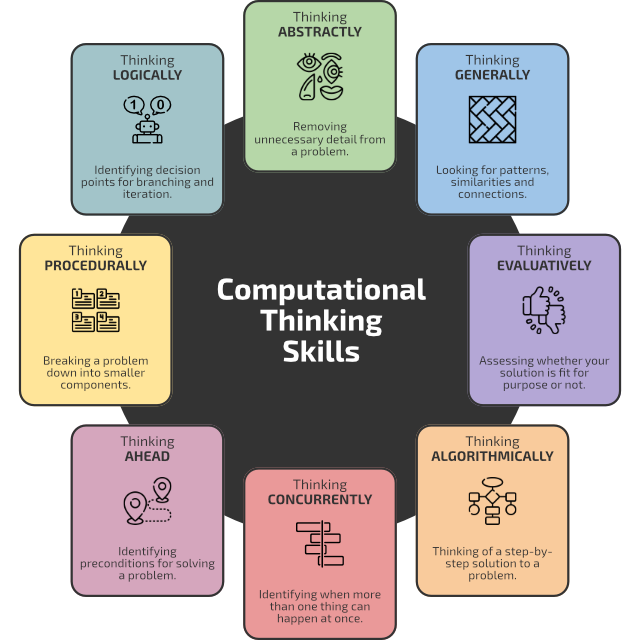
Computational Thinking Skills
More recently, one of the most well-known protagonists of CT has been Jeanette Wing formally of Microsoft Research, expressing the algorithmic problem-solving and abstraction techniques used by computer scientists and how they might be applied in other disciplines.
WWW Links
🌐
en.wikipedia.org
In education, computational thinking (CT) is a set of problem-solving methods that involve expressing problems and their solutions in ways that a computer could also execute.
🌐
en.wikipedia.org
Jeannette Marie Wing is Avanessians Director of the Data Science Institute at Columbia University, where she is also a professor of computer science.
🌐
en.wikipedia.org
Logo is an educational programming language, designed in 1967 by Wally Feurzeig, Seymour Papert, and Cynthia Solomon.
🌐
mindstorms.media.mit.edu
Seymour Papert’s Mindstorms was published by Basic Books in 1980, and outlines his vision of children using computers as instruments for learning.
🌐
en.wikipedia.org
Seymour Aubrey Papert was a South African-born American mathematician, computer scientist, and educator, who spent most of his career teaching and researching at MIT.
Last modified: September 21st, 2026

















