




lesson 3.8.3 creating procedures
Using def to Create Reusable Blocks of Code
Welcome back, Systems Architects! Last lesson, you designed a professional blueprint (structure diagram) to fix the messy "Village" code and learnt how to draw structure diagrams using diagrams.net. Today, you are going to put on your hard hats and start building. We are going to learn how to turn those boxes on your diagram into real, working Python blocks called procedures. You'll learn how to teach the computer new words (commands) so that instead of copying and pasting code, you can just say
draw_widget()Learning Outcomes
The Building Blocks (Factual Knowledge)
The Connections and Theories (Conceptual Knowledge)
The Skills and Methods (Procedural Outcomes)
StateI have no idea what this means that the
defIdentifyI have no idea what this means the body of a procedure by its indentation level.
DescribeI have no idea what this means the difference between defining a procedure and calling it.
The Connections and Theories (Conceptual Knowledge)
ExplainI have no idea what this means how procedures are used to implement the decomposition planned in a structure diagram.
ExplainI have no idea what this means that using a procedure is a form of abstractionI have no idea what this means where the implementation details are hidden.
AnalyseI have no idea what this means the benefits of code reusability for maintenance and efficiency.
The Skills and Methods (Procedural Outcomes)
WriteI have no idea what this means a simple, self-contained procedure to solve a single sub-problem (A.1.7).
RefactorI have no idea what this means a monolithic block of code by moving distinct sub-tasks into separate procedures (A.4.7.1).
Digital Skill Focus: Use a text editor with syntax highlighting to write a simple program (A.4.2).
Teaching the Computer New Tricks
In our previous lessons, we saw that writing one long list of instructions (Monolithic Code) is messy. It's hard to read, hard to fix and repetitive.
We fixed the plan by creating a Structure Diagram. Now we need to fix the code.
In Python, we can group a set of instructions together and give them a name. This is called a ProcedureType of subroutine which may take parameters but returns no value. Used to structure code.. Think of it like teaching the computer a new trick. Once you teach it how to
draw_widget()The Syntax of a Procedure

defdef procedure_name():
# Code goes here.
# Must be indented!
Here is the "Recipe" for a procedure:
1
Define: Start with
def2
Name: Give it a sensible name (using snake_case).
3
Parentheses: Add brackets
()4
Colon: End the line with a colon
:5
Indentation: All the code that belongs to the procedure MUST be indented (moved to the right).

Task 1 Starry, Starry Night?
So, it's simple to get Python turtle to draw a square but what if I wanted to draw a hundred squares or I wanted it to draw a thousand squares and I wanted each one to have a random colour and be drawn at a random position on the turtle canvas and...
1
Get Organised
Download the shape-sketcher.py script and make sure it's saved somewhere safe.
Open it with Thonny (other IDEs are available) but DON'T run it yet.
Organise your workspace!
2
PRIMM!
PREDICT
Do not run the code yet. Read through the script on your screen and discuss the following questions with your partner and write the answers on your whiteboard (if you have one).
Do not run the code yet. Read through the script on your screen and discuss the following questions with your partner and write the answers on your whiteboard (if you have one).
1
Look at the list
["red", "green", "blue", "pink", "yellow"]2
Look at the line
for i in range(100):3
There is a function called
draw_square()4
If you have a whiteboard, sketch what you think the final screen will look like.
RUN
Now, run the script (press F5 or click the green 'play' button). Watch the animation carefully. Did the output match your prediction? What happens if you run the program a second time? Is the picture exactly the same?
Now, run the script (press F5 or click the green 'play' button). Watch the animation carefully. Did the output match your prediction? What happens if you run the program a second time? Is the picture exactly the same?
INVESTIGATE
Answer these questions to understand how the code works. You will need to look closely at specific lines.
Answer these questions to understand how the code works. You will need to look closely at specific lines.
1
The Grid: Look at
x = random.randint(-200,200)(-50, 50)2
The Pen: Why do we use
t.penup()t.goto(x,y)#3
The Logic:
Line 15 says
for i in range(4):Line 23 says
for i in range(100):4
The Procedure: Why do we put the instructions to draw a square inside
def draw_square():MODIFY
Now let’s change the code to make it our own. Complete these challenges in order.
Now let’s change the code to make it our own. Complete these challenges in order.
Bronze (Aesthetics): Change the list of colors. Add "orange", "purple", and "black". Remove "yellow". Run the code again. Like what you see?
Silver (Geometry): Change the code so that the squares are larger, e.g. have a side length 50 instead of 20. How does this look?
Gold (Logic): Change the
draw_squarePlatinum (Boundaries): Change the code so that it draws 500 shapes, but spreads them out over a larger area (try coordinates -400 to 400). You might also want to speed up the drawing - see if you can work out how.
MAKE
Using the code you have just learned, create a new script to create a scene that looks like a night sky.
Using the code you have just learned, create a new script to create a scene that looks like a night sky.
Create a new script and save it as starry-night.py in a safe place.
Set the background color to black (Use the instruction
screen.bgcolor("black")screenCreate a procedure called
draw_star()def draw_star():
color = random.choice(["yellow", "white"])
t.color(color)
t.fillcolor(color)
t.pendown()
t.begin_fill()
for i in range(5):
t.forward(20)
t.left(144)
t.end_fill()
t.penup()
Use this procedure to draw 50 stars scattered randomly across the screen.
Outcome: I have predicted what will happen when I run a Python script. I may even have drawn a lovely picture of a starry night...

From Blueprint to Bricks
So, in the first lesson of this module, we saw some monolithic code designed to draw just three houses. I think now, we are in a position to do a little better and maybe even draw a village!

Task 2 The Village Vision
Before we start, we need to break down our problem using a structure diagram so we can identify the different procedures we need to design.
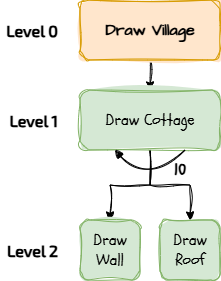
The main goal (Level 0) is to draw a village.
To do this, we need to draw a cottage (Level 1) more than once.
We design a
draw_cottage()Each cottage can be structurally decomposed to a wall and a roof.
We design a
draw_wall()We design a
draw_roof()1
Get Organised!
Download the village-vision.py script and make sure it's saved in a safe place.
Open the script in Thonny (other IDEs are available).
Organise your workspace.
2
Tell Python how to draw a wall
Copy this procedure definition and paste it into the correct place in the template (on Line 9).
def draw_wall():
  color = random.choice(["skyblue", "purple", "forestgreen"])
  t.color(color)
  t.fillcolor(color)
  t.pendown()
  t.begin_fill()
  for i in range(4):
      t.forward(20)
      t.left(90)
  t.end_fill()
  t.penup()
3
Tell Python how to draw a roof
Copy this procedure definition and paste it into the correct place in the template (probably on Line 22).
def draw_roof():
    color = random.choice(["slategrey","gold","seagreen"])
    t.color(color)
    t.fillcolor(color)
    t.pendown()
    t.begin_fill()
    for i in range(3):
      t.forward(20)
      t.left(120)
    t.end_fill()
    t.penup()
4
Tell Python how to draw a cottage
Copy this procedure definition and paste it into the correct place in the template (probably on Line 35).
def draw_cottage():
    draw_wall()
    t.goto(t.xcor(),t.ycor()+20)
    draw_roof()
5
Let's get building!
So, we're ready to build our village... Just press ▶ PLAY!
Outcome: I have refactored a monolithic script into a modular program using a reusable procedures.
Why did we do this?
By using procedures, we have achieved Abstraction. We have hidden the complex details of how to draw a cottage inside the procedure. The main part of our program is now just a simple list of commands: "Go here, draw a cottage, go there, draw a cottage"...
Readable: Humans can understand what
draw_wall()draw_roof()draw_cottage()Maintainable: If we want to change the roof colour to green, we only have to change it in one place (inside the definition), and every house will update automatically!

Out of Lesson Learning


Last modified: January 26th, 2026

















