


s5.07.05 - sql, dml, select, insert, update, delete
Master SQL Data Manipulation Language (DML): SELECT, INSERT, UPDATE, DELETE for A-Level relational databases.

You've spent time designing and building the perfect database structure. Now for the exciting part - bringing it to life with data! Today, you become a Database Administrator and Software Developer, learning the essential commands to find, add, change, and remove information in your database. Get ready to use SQL's Data Manipulation Language (DML) to interact with the empty 'World' database you built last lesson!
Learning Outcomes
Factual (Knowing that)
Conceptual (Knowing why)
Procedural (Knowing how)
Recall the meaning and purpose of Data Manipulation Language (DML).
Describe the basic syntax and function of `SELECT`, `INSERT INTO`, `UPDATE`, and `DELETE FROM` SQL commands.
State the importance of the `WHERE` clause in DML operations.
Conceptual (Knowing why)
Analyse how DML commands enable interaction with data while maintaining data integrity.
Explain the impact of omitting a `WHERE` clause in `UPDATE` and `DELETE FROM` statements.
Justify the use of specific DML commands for different data management tasks.
Procedural (Knowing how)
Apply the `SELECT` command with `FROM`, `WHERE`, `ORDER BY`, and `LIMIT` clauses to retrieve specific data.
Implement `INSERT INTO` statements to add new records to a database table.
Construct `UPDATE` statements to modify existing data in a table.
Create `DELETE FROM` statements to remove records from a table.
The Deep Dive
Interacting with Data: Data Manipulation Language (DML)
Last lesson, you acted as a Database Architect, using Data Definition Language (DDL) to build the empty skeleton of your 'World' database. Today, you become a Database Administrator and Software Developer, bringing that skeleton to life by inserting and interacting with the data itself. This is where Data Manipulation Language (DML) comes in.
What is Data Manipulation Language (DML)?
Data Manipulation Language (DML) is a subset of SQL (Structured Query Language) used for managing data within database objects (like tables). While DDL defines the structure of your database, DML lets you actually work with the data inside that structure. Think of it as the commands you use to read, write, edit, and delete the actual information.
The four core DML commands, often collectively referred to as CRUD operations (Create, Read, Update, Delete), are:
INSERT INTOSELECTUPDATEDELETE FROMCollectively, this is known as CRUD.
Technically, the
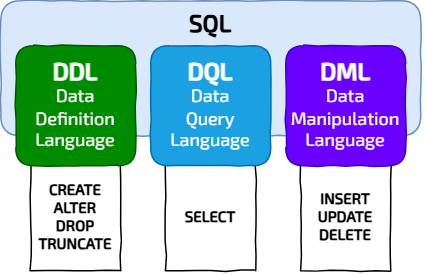
SELECTAdding New Data: The INSERT INTO
Statement
INSERT INTOThe INSERT INTO statement allows you to add new records (rows) into an existing table.
INSERT INTO TableName (column1, column2, ...)
VALUES (value1, value2, ...);
You must provide values for all
NOT NULLAUTOINCREMENT-- Insert a new language
INSERT INTO Language (LanguageCode, LanguageName)
VALUES ("kli", "Klingon");
Retrieving Data: The SELECT
Statement
SELECTThe
SELECTSELECT column1, column2 FROM TableName;
column1, column2TableName-- To see all continent names
SELECT ContinentName FROM Continent;
Filtering Results: The WHERE
Clause
WHERETo retrieve specific data that meets certain criteria, you use the WHERE clause. This is crucial for precise data retrieval and manipulation.
SELECT column1, column2 FROM TableName WHERE Condition;
Condition-- To find cities with a population greater than 8,000,000
SELECT CityName, Population FROM City WHERE Population > 8000000;
Filtering with a pattern
Most SQL flavours, including SQLite, come with pattern matching for the Condition clause.
SELECT column_list FROM table_name WHERE column_name LIKE pattern;
pattern: A regex like expression with only two wildcard character:
'%' wildcard matches any sequence of zero or more characters.
'_' wildcard matches zero or one character.
-- To find all the cities names starting with 'P'
SELECT CityName from city WHERE CityName LIKE 'P%';
Sorting Results: The ORDER BY
Clause
ORDER BYTo sort your results, use the ORDER BY clause.
ASCDESC-- List continents in reverse alphabetical order
SELECT ContinentName FROM Continent ORDER BY ContinentName DESC;
Limiting Results: The LIMIT
Clause
LIMITTo restrict the number of rows returned, use the LIMIT clause.
-- List the top 3 most populous cities
SELECT CityName, Population FROM City ORDER BY Population DESC LIMIT 3;
Modifying Data: The UPDATE
Statement
UPDATEThe UPDATE statement is used to modify existing data in one or more records in a table.
UPDATE TableName
SET column1 = new_value1, column2 = new_value2, ...
WHERE Condition;
CRITICAL NOTE: Always, always, ALWAYS use a
WHERE-- Update London's population
UPDATE City
SET Population = 8674000
WHERE CityName = 'London' AND CountryCode = 'GBR';
Removing Data: The DELETE FROM
Statement
DELETE FROMThe DELETE FROM statement is used to remove one or more records from a table.
DELETE FROM TableName WHERE Condition;
CRITICAL NOTE: Just like `UPDATE`, always use a
WHERE-- Delete a city
DELETE FROM City
WHERE CityName = 'St Asaph' AND CountryCode = 'GBR';
The DBMS and Data Integrity
A Database Management System (DBMS) (like SQLite, MySQL, PostgreSQL) ensures that all your DML operations respect the DDL rules you defined. For instance, you cannot `INSERT` a record with a foreign key that doesn't exist in the parent table; the DBMS will prevent this to maintain referential integrity. This automatic enforcement by the DBMS is vital for building robust applications (such as your NEA project!) and is a key responsibility of a Database Administrator.

Don't just accept the text. Write down three high-level 'Why' or 'What if' questions about these notes that aren't explicitly answered here. Use these to challenge your teacher or guide your independent study.
Comprehension Questions
Answer these questions on your lesson sheet.1
What is the primary purpose of Data Manipulation Language (DML) in SQL?
2
State the function of the `SELECT`, `INSERT INTO`, `UPDATE`, and `DELETE FROM` SQL commands.
3
Explain why the `WHERE` clause is crucial when using `UPDATE` and `DELETE FROM` statements.
4
How does a DBMS help maintain referential integrity when DML commands are executed?
5
Give an example of when you would use the `ORDER BY` clause with `SELECT`, and how you would specify descending order.

Task World Data Navigator: Querying and Modifying
Welcome, Master Data Navigator! You've successfully built the 'World' database structure. Now, let's unlock its potential by interacting with the data itself. Your mission is to precisely create, read, update and delete records, transforming raw information into actionable insights and maintaining data integrity like a true Database Administrator.
0
Get Organised!
Ensure you have Computing Cafe SQLite Editor open.
Download a completely clean, correct version of the world.db file.
Replace the version in SQLite Editor with this one.
Organise your workspace!
1
Populate your World!
Make sure you have imported your empty
world.db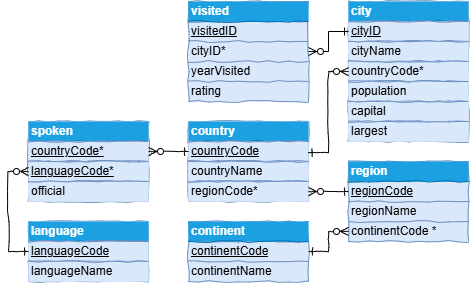
For each of the sql text files listed below:
Click the link to download;
Open the file in a plain text editor like Notepad;
Select all the text (CTRL+A);
Copy the text onto the clipboard with CTRL+C;
Switch to the SQL tab in the SQLite Editor;
Paste the text into the editor with CTRL+V;
Click the 'Run' buttons.
You should see
Query executed successfully. No data returned.ContinentDump.sql (6 Rows)
LanguageDump.sql (184 Rows)
RegionDump.sql (25 Rows)
CountryDump.sql (238 Rows)
CityDump.sql (4513 Rows)
SpokenDump.sql (465 Rows)
VisitedDump.sql (56 Rows)
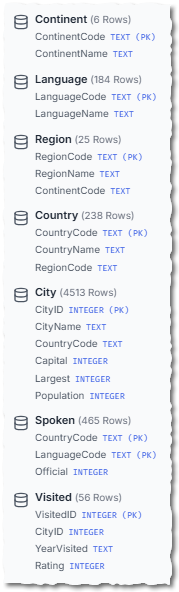
Your Schema should look like this
You might want to export a copy of
world.db1
Querying Data (SELECT - Single Table)
Clear the 'SQL pane' in Computing Cafe SQLite Editor. For each question, write and execute a `SELECT` query. Copy the query onto your lesson sheet and note the number of rows returned (given in brackets, visible in the 'Console' tab).
List out the names of all the continents (6 rows).
List out the names of continents in reverse alphabetical order (6 rows).
List out the names of all the capital cities (239 rows).
List out the name and population for Berlin (1 row).
List out the names of all Languages with a space in their name (10 rows).
List out the names of the top 3 cities and their populations for those cities with populations greater than 8,000,000. This list should be given in decreasing order of population (3 rows).
2
Inserting New Records (INSERT INTO)
Experiment with adding new data. Before each `INSERT`, run a `SELECT` query to see the current state, and after, run another `SELECT` to verify your changes. Remember to click the download icon (cloud with a down arrow) to save your database after making changes!
Insert a new city called 'Manchester' in Great Britain (GBR) with a population of 465900. It is neither the largest nor the capital city of Great Britain.
Insert a new city called 'Machala' in Ecuador (ECU) with a population of 241300. It is neither the largest nor the capital city of Ecuador.
Insert another language into the `Language` table called 'Klingon' with a language code of 'kli'.
3
Deleting Records (DELETE FROM)
Carefully remove data. Always run a `SELECT` query before a `DELETE` to ensure you target the correct records! Remember to click the download icon (cloud with a down arrow) to save your database!
Delete the city called 'St Asaph' from the `city` table.
Delete 'Klingon' from the `Language` table.
Delete details of all the cities that I visited in 2010 from the `Visited` table.
4
Updating Records (UPDATE)
Modify existing data. Always run a `SELECT` query before an `UPDATE` to see the current values, and after, run another `SELECT` to verify your changes. Remember to click the download icon (cloud with a down arrow) to save your database!
Update the population of 'London' in Great Britain (careful!) to 8764000.
Change the population of Houma in China (CHN) from 122717 to 225123.
Correct the spelling mistake in the spelling of 'Swedish' in the `Language` table. Its language code is 'swe'.
5
Finally, export your database and marvel at it's beauty.
Before you finish, click the Export button in the SQLite Editor and save your fully populated world.db file somewhere safe.

Hungry for more?
Search the web: SQL DML advanced clauses aggregate functions
Ask an AI: Click on the carefully written prompt below to learn more...

Role: Senior Database Developer. Task: Explain the critical role of the WHERE clause in SQL DML operations (UPDATE, DELETE) for a Key Stage 5 Computer Science student. Focus on the consequences of its omission and the importance of testing. Limit response to 150 words. NO intro, NO outro, NO deviation from the topic, NO follow-up questions.
Prepare for Advanced Queries: Perform research on SQL 'JOIN's in preparation for next lesson...
Outcome: A successfully queried and modified `world.db` database, demonstrating proficiency in core SQL DML commands and an understanding of data integrity.

Sticky Note Challenge
On a sticky note, write down the four main DML commands and a single sentence describing the purpose of each.
Last modified: October 23rd, 2026


