




lesson 3.9.6 tracing a connection
Following the route data packets take as they travel the world.

Welcome back to the network! Have you ever wondered exactly how your computer talks to a server on the other side of the planet? Today, you are going to step into the shoes of a Network Architect and Cybersecurity Analyst! Instead of just talking about how the internet works in theory, we are going to look under the hood using professional visual mapping tools. We will track the actual hops your data takes across oceans and continents, evaluating network speeds and seeing packet switching in action. Grab your digital detective gear, because it's time to trace the connection!
Learning Outcomes
The Building Blocks (Factual Knowledge)
The Connections and Theories (Conceptual Knowledge)
The Skills and Methods (Procedural Outcomes)
Recall the definition of a network hop and the purpose of an IP address in routing.
Describe the function of basic network diagnostic tools such as ping and visual traceroute applications.
The Connections and Theories (Conceptual Knowledge)
Analyse the visual output of a traceroute application to determine the physical and logical path of a connection.
Evaluate how packet switching allows networks to bypass failed nodes and maintain global connectivity.
The Skills and Methods (Procedural Outcomes)
Apply web-based visual traceroute tools to independently map the route to various remote servers.
Create a comparative record of a data packet's journey based on real-time geographical diagnostic feedback.
Digital Skill Focus: I can confidently use web-based diagnostic applications to interrogate digital systems and gather geographical data to troubleshoot network connectivity issues.
Checking the Pulse of the Network
Have you ever played a multiplayer game and complained about "lag"? What you are actually experiencing is latency - the time it takes for a data packet to travel from your device to a server and back again.
When conducting network troubleshooting, the first thing a network engineer does is check if the destination is reachable. They do this using a fundamental tool called ping. Named after the sound a submarine's sonar makes, ping sends a tiny, simple ICMP (Internet Control Message Protocol) packet to a specific IP address and waits for an echo reply. If it gets a reply, it calculates the exact round-trip time in milliseconds (ms).

Mapping the packet's journey
If ping is like shouting across a room to see if someone is there, traceroute is like tracking the exact footsteps of a messenger delivering a letter. The internet is not a single, straight cable. It is a massive web of interconnected routers. When you request a webpage, your data packet jumps from one router to the next until it reaches its destination. Each of these jumps is called a hop.
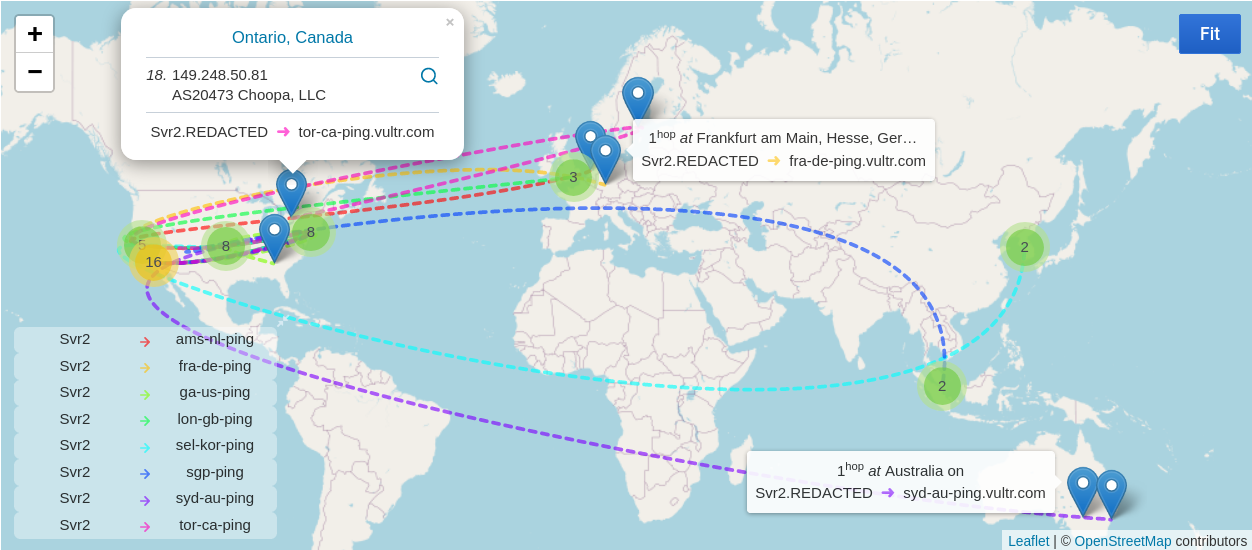
A Typical Visual Traceroute Map
Traceroute works by intentionally sending ICMP packets with a very short "Time to Live" (TTL). When a packet's TTL expires, the router it died on sends a message back to you. By slowly increasing the TTL limit (1 hop, then 2 hops, then 3 hops), traceroute forces every single router along the path to reveal its identity and, crucially, it's IP address. This allows us to see the exact path chosen by packet! Because routers constantly update their paths to avoid traffic, if you run a traceroute alongside your classmate, you might actually get a different set of IP addresses. Packets take many different routes!

Task Digital Detectives: Tracing the Route
It is time to become a network diagnostic expert! You are going to use the output of a professional network diagnostic tool to spy on the exact path data takes across the globe.
1
Gather your Intelligence
Your teacher has already performed a traceroute to https://www.sydney.edu.au/ (The University of Sydney in Australia) and the results are shown below.
C:\Windows\System32>tracert sydney.edu.au

Tracing route to sydney.edu.au [20.248.131.216]
over a maximum of 30 hops:

 1   <1 ms   <1 ms   <1 ms  10.2.101.254
 2    6 ms    5 ms    5 ms  172.18.246.106
 3    6 ms    6 ms    6 ms  188.227.243.113
 4   12 ms   13 ms   12 ms  185.88.58.221
 5   13 ms   13 ms   13 ms  185.88.58.200
 6   19 ms   18 ms   14 ms  78.109.186.10
 7   18 ms   19 ms   18 ms  104.44.47.109
 8   16 ms   16 ms   22 ms  104.44.239.115
 9  286 ms  280 ms    *     104.44.21.115
10  274 ms    *     273 ms  51.10.27.20
11  437 ms  273 ms  272 ms  51.10.23.142
12  280 ms  277 ms  274 ms  104.44.29.133
13  279 ms  276 ms    *     51.10.43.117
14  276 ms  275 ms  274 ms  51.10.12.40
15  272 ms  274 ms  274 ms  51.10.43.190
16  287 ms  274 ms  274 ms  51.10.11.212
17  276 ms  275 ms  273 ms  51.10.4.242
18    *        *      *     Request timed out.
19    *        *      *     Request timed out.
20    *        *      *     Request timed out.
21    *        *      *     Request timed out.
22  273 ms  273 ms  273 ms  20.248.131.216
Look carefully at the columns in the results:
Column 1 shows the 'hop' number;
Column 2, 3 and 4 show the three ping round trip times;
Column 5 shows the IP (Internet Protocol) address of the device at the end of the hop.
2
Map the journey
Grab a copy of the world map from your teacher.
1
Type each IP address from the trace into the tool below one by one.
2
On the handout, note the City and Country for each hop in the table.
3
Now, plot the route that the data takes on the map. You can use Google Maps to help you to locate the cities if you need to. Notice how the route probably doesn't go in a straight line and probably goes to places you didn't expect it to!
3
Consult the AI
Are you confused about why your data packet went to America before going to Australia? Use this perfectly crafted prompt to find out:
Act as a supportive, expert computer science tutor. I just ran a traceroute from the UK to Australia, and my data packet routed through the United States first. Explain why the internet would choose a longer geographical path using the concepts of packet switching and submarine cables. Limit your response to 100 words. Explain this so a 12-year-old KS3 student can understand. Keep the tone encouraging, clear, and avoiding overly academic jargon. Include 1 real-world analogy. Do not write my essay for me. NO intro, NO outro, NO deviation from the topic, NO follow-up questions.
Now complete the last part of the sheet and hand it to your teacher.
Extension: The Command Line
Depending on your school, you may be able to run the tracert command yourself.
1
Open up the command prompt from the start menu
2
Type
tracert sydney.edu.au3
Wait for the trace to complete (this could take a while), and look at the list of IP addresses it discovers, in the order they are discovered. Does this agree with the route that your teachers tracert took?
Outcome: A plotted geographical map of a data packet's journey, proving an understanding of hops, routing, and packet switching.


Out of Lesson Learning


Last modified: April 27th, 2026

















