




lesson 3.8.2 decomposition with structure diagrams
Breaking Down Problems into Sub-Problems

Remember the "Bad Code Village" from our last lesson? It was a nightmare to fix because the code was a messy list of instructions. Today, you are going to fix that by becoming a Systems Architect. Before we write any new code, we need a plan. You will use Decomposition to physically piece together the structure of the village using cards, and then use professional diagramming software to design a brand new video game system.
Learning Outcomes
The Building Blocks (Factual Knowledge)
The Connections and Theories (Conceptual Knowledge)
The Skills and Methods (Procedural Outcomes)
Define decomposition as the process of breaking down a complex problem into smaller, manageable sub-problems.
State that a Structure Diagram is a hierarchy chart used to visualise the breakdown of a system or process.
Distinguish between a System decomposition (breaking a whole into independent parts) and a Process decomposition (breaking a task into sequential steps).
The Connections and Theories (Conceptual Knowledge)
Explain how creating a structure diagram helps to identify reusable components (patterns) within a problem.
Analyse a problem to determine whether its sub-tasks need to be performed in a specific sequence or if they are independent modules.
Illustrate the hierarchy of a solution, showing how detailed tasks (Level 2) support high-level goals (Level 0).
The Skills and Methods (Procedural Outcomes)
Construct a structure diagram using a physical card sort to decompose the "Village" scenario.
Digital Skill Focus: Create a professional hierarchy diagram using specialised diagramming software (diagrams.net)
What is Decomposition?

We visualise this using a Structure Diagram. It looks like an upside-down tree.
Level 0: The main goal (The Root).
Level 1: The main sub-problems.
Level 2: The detailed steps... etc
We can carry on subdividing the main goal until our tasks become atomic and simple to solve.
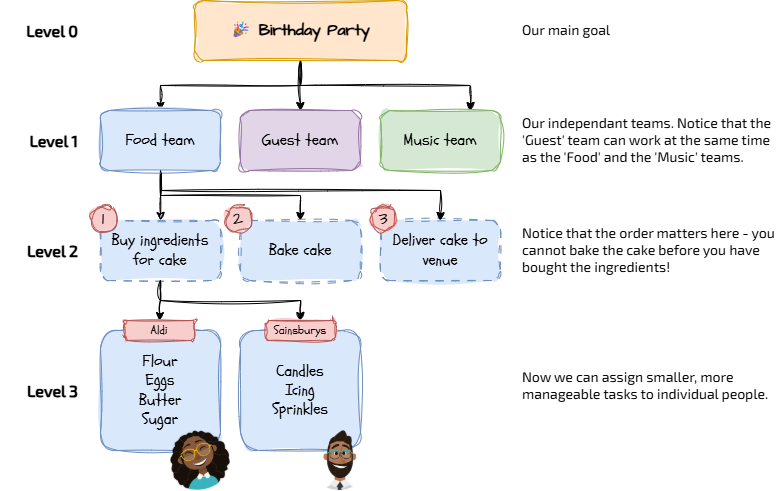
A structure diagram for my birthday party
Systems vs. Processes: The Critical Distinction
When we draw these diagrams, it is important to know what we are breaking down. Are we listing the parts of a machine, or the steps of a recipe?
1
System Decomposition (The "Parts")
When we break down a system, we are looking for Modules. These are the separate parts that make up the whole. They can be developed independently, tested independently and maintained independently.
Example: Designing A Car.
Sub-problems:
Engine
Wheels
Chassis
Interior
Key Feature: These parts are Independent. You can design the wheels without worrying about the engine. They don't necessarily happen in a "left-to-right" order.
2
Process Decomposition (The "Steps")
When we break down a task, we are looking for Sequence. These are the steps required to finish a job. They usually have to be carried out in order. They are usually dependent on their predecessor and their successor is dependent on them.
Example: Starting a Car.
Sub-problems:
1. Get key from pocket,
2. Insert key in ignition barrel,
3. Turn key and hold,
4. Wait until engine starts,
5. Let go of key.
Key Feature: These steps are Sequential. You must do them in order (from left to right in the diagram). In the example above, I have numbered them and drawn them with a dashed border but this isn't conventional. I just like it.

Task The Game Architect
You are the Lead Systems Architect for a new game, "Cyber-Jump 2077". You need to create a professional blueprint using diagrams.net.
1
Get organised
Visit diagrams.net to start a new blank diagram.
Organise your workspace so you can see your diagram and these instructions on the screen at the same time.
2
Familiarise yourself with the interface
Diagrams.net is a very powerful and completely free diagram drawing software application that you can access via the web or through a dedicated app. You can connect it to your Google Drive or Microsoft OneDrive accounts to access diagrams you have saved there as well. Take a look around the user interface and make sure you are familiar with where the tools are.
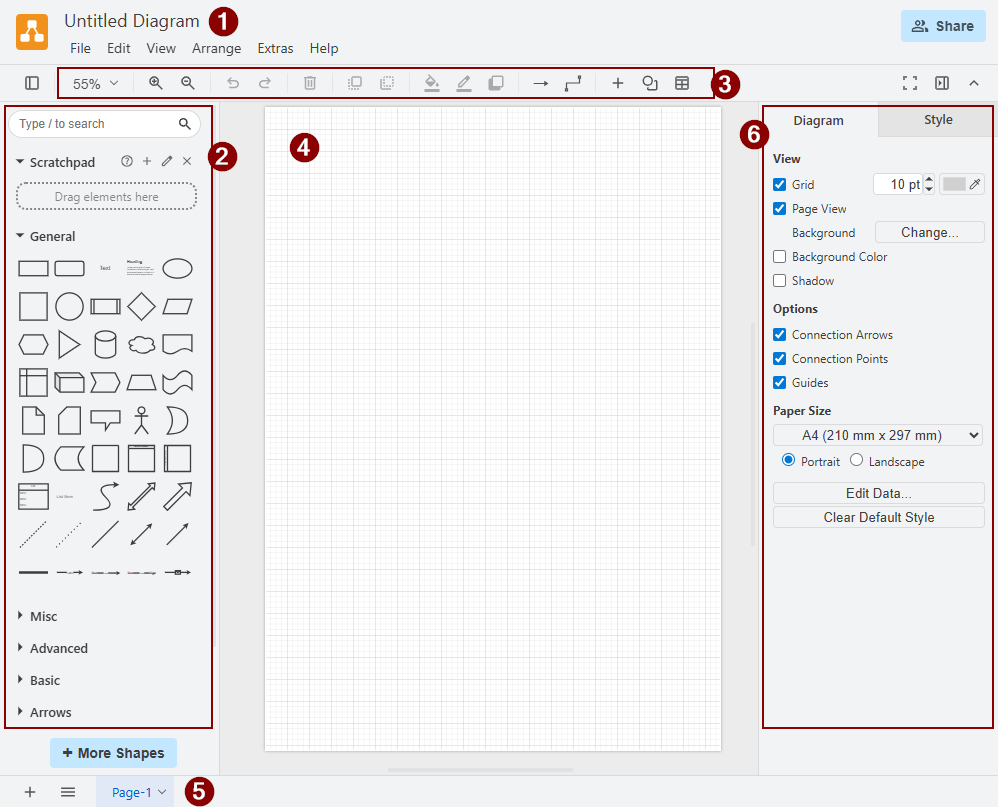
1. Document filename.
2. Drawing toolbox.
3. Quick tools.
4. Canvas.
5. Tabs.
6. Contextual property panels.
2. Drawing toolbox.
3. Quick tools.
4. Canvas.
5. Tabs.
6. Contextual property panels.
3
Get drawing!
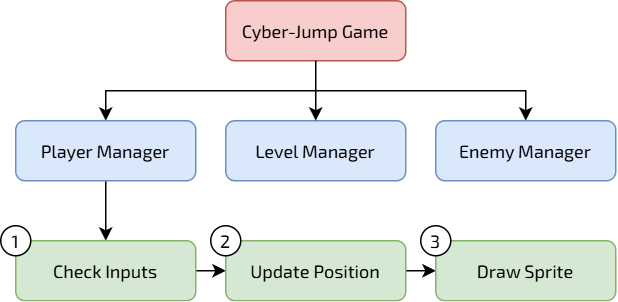
Level 0: Goal Drag a rectangle to the top centre. Label it
Cyber-Jump GameLevel 1: System Decomposition We need to break the game into its main independent parts.
Create 3 boxes under the main one:
Player ManagerLevel ManagerEnemy ManagerConnect them to the top box with arrows.
Tip: These are independent parts. You can work on the Player without worrying about the Level.
Level 2: Process Decomposition Now we need the steps for the Player.
Under
Player ManagerCheck InputsUpdate PositionDraw SpriteConnect them to
Player ManagerTip: These are sequential steps. You must check inputs BEFORE you update the position!
Styling
Colour the Main Goal box (Level 0) Red.
Colour the System boxes (Level 1) Blue.
Colour the Process boxes (Level 2) Green.
Sneaky Peak...
Your completed diagram should look like this...
4
Save and share your creations!
Make sure the filename is set and NOT 'Untitled Diagram' 🙄.
Save your diagram as a '.drawio' XML file
File > Save As... > Where > Device
Click Save.
Click Save again.
Export your diagram as an Image
File > Export as > PNG
Check the export options are OK.
Click Export.
Make sure the filename is OK and that you choose Device as the export destination.
Click Save.
Click Save again.
Outcome: I have designed a professional structure diagram using digital tools, distinguishing between independent system modules and sequential process steps.


Out of Lesson Learning


Last modified: January 26th, 2026

















