




lesson 3.14.1 representing algorithms
Planning algorithms using flowcharts and pseudocode.

Welcome to the drawing board! Before a Software Developer writes a single line of code, they act like an architect, creating a precise blueprint of their ideas. Today, you are going to learn the universal languages of algorithmic thinking: flowcharts and pseudocode. Just like a map helps you navigate a new city, these tools help computer scientists plan complex routes through logic without getting lost in syntax errors. Whether you want to design games, build robots, or analyse big data, it all starts with a clear plan. Let's get planning!
Learning Outcomes
The Building Blocks (Factual Knowledge)
The Connections and Theories (Conceptual Knowledge)
The Skills and Methods (Procedural Outcomes)
State that algorithms can be represented using flowcharts and pseudocode.
Identify the standard flowchart symbols for start/end, input/output, process, and decision.
Describe the features of a good algorithm: correctness, efficiency, and termination.
The Connections and Theories (Conceptual Knowledge)
Explain why algorithms must be precise and unambiguous compared to natural language.
Distinguish between the algorithm (the plan) and the program (the implementation).
Explain how the flow of control (sequence, selection, iteration) is visualised in a flowchart.
The Skills and Methods (Procedural Outcomes)
Interpret and trace a given algorithm represented as a flowchart to determine its output.
Create an algorithm for a simple problem using standard flowchart symbols.
Create an algorithm for a simple problem using structured English or pseudocode.
Digital Skill Focus: C.3.1.2 Presentation Software: Incorporate and format various media types, including text, images, tables, and embedded content like video and audio. (Specifically using shape tools and connectors to create diagrams).
What is an Algorithm?
Imagine you are trying to bake a cake. You wouldn't just throw eggs and flour into a bowl at random; you would follow a recipe. In Computer Science, that recipe is called an algorithm.
An algorithm is a precise, step-by-step set of instructions used to solve a problem or complete a task. It takes inputs (like ingredients), processes them (mixing and baking), and produces outputs (a delicious cake).
However, computers are not as smart as humans when it comes to guessing. If a recipe says "add a pinch of salt", you know what that means. A computer does not. Algorithms must be:
Precise: Exact instructions with no ambiguity.
Ordered: The steps must happen in the correct sequence.
Finite: The algorithm must eventually finish (terminate).
The "Human Robot" Problem
Natural language (the way we speak) is often too fuzzy for computers. Words can have double meanings, and we often assume people know what we mean. To program effectively, we need to bridge the gap between human thought and machine code using tools like Flowcharts and Pseudocode.
A dad following instructions to make a sandwich
The Literal Problem
Humans are great at guessing. If I say "Make a sandwich," you know I mean "Take the bread out of the bag first." Computers are not smart; they are literal. They do exactly what you tell them, even if it's silly. Watch this "human CPU" fail because the algorithm wasn't precise enough.
Humans are great at guessing. If I say "Make a sandwich," you know I mean "Take the bread out of the bag first." Computers are not smart; they are literal. They do exactly what you tell them, even if it's silly. Watch this "human CPU" fail because the algorithm wasn't precise enough.
Visualising Logic: Flowcharts
A flowchart is a diagram that represents an algorithm, workflow, or process. It helps us see the "flow" of control through a program. Instead of writing code immediately, Systems Architects and developers use flowcharts to plan complex logic.
We use standard shapes so that anyone, anywhere can understand our plan:
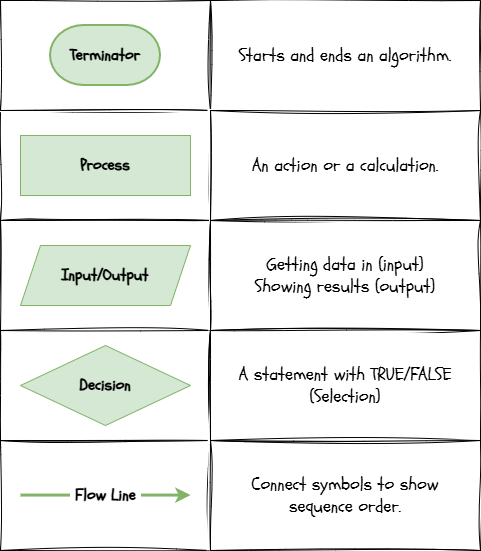
Flowchart Symbols
By following the arrows, you can "trace" the logic to see exactly what happens next.
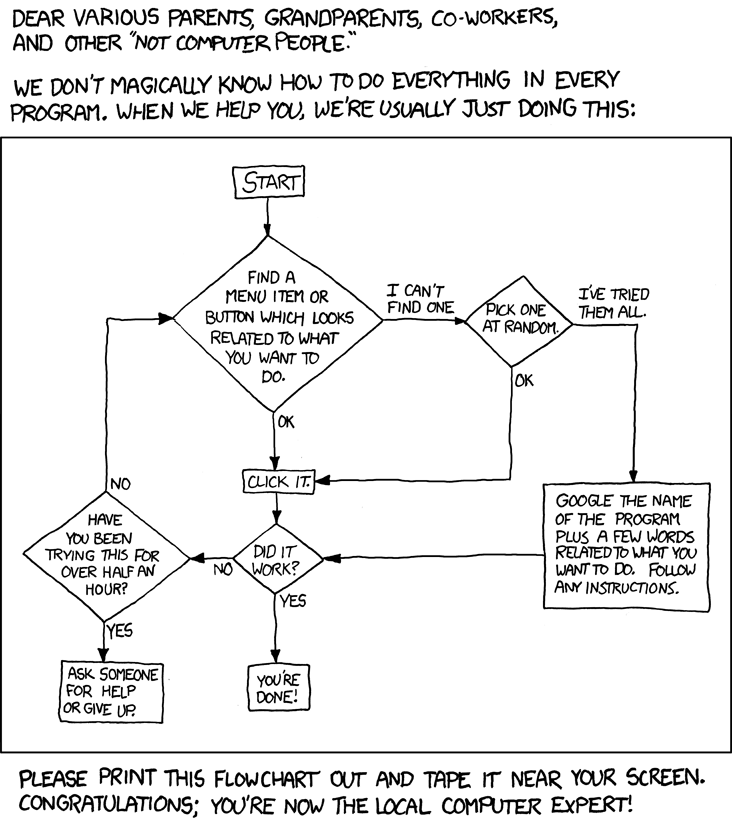
Become a tech support expert. Can you spot where the tech support person gets stuck in a cycle?

Task 1 Flowcharting a Vending Machine
Let's design the brain of a vending machine! For this challenge, we will use diagrams.net - a fantastic diagramming tool which is free to use.
1
Get Organised!
Open diagrams.net. It should automatically take you to a new diagram.
2
Draw your flowchart
Your task is to reproduce this flowchart using the symbols in the 'flowchart' toolbox on the left hand side. Try to match the style and the colours. The arrow connections are tricky but if you hover over the edge of the shape, you will see a green dot which is the connection point.
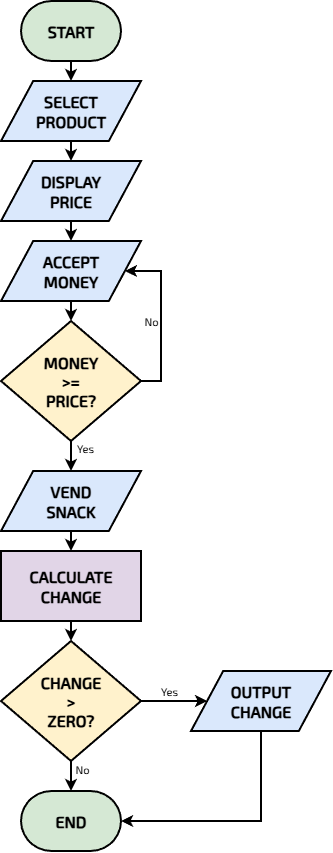
A Vending Machine
3
Save your masterpiece
It's easy to save the drawio file on your device so you can carry on working on it later.
1
Choose File > Save as...
2
Give your creation a filename, for instance vending-machine.drawio.
3
Make sure Where is set to Device and click Save.
4
Export your masterpiece
If you have completely finished, you can export an image file so you can use it in your documents. Beware that you can't edit it afterwards so make sure you've saved it as well, just in case.
1
Choose File > Export as > PNG...
2
Leave the default options on the dialogue box and click Export.
3
Give your export a name or accept the default (it's the same as the drawing name).
4
Make sure Where is set to Device and click Save.
5
Can you follow it?
Now, choose a partner to 'trace' the algorithm with. You have to imagine being stood in front of a vending machine and think about the steps that you would need to go through in order to get your choccy bar.
Outcome: A valid flowchart representing a vending machine selection algorithm.

Structured English: Pseudocode
Drawing diagrams is great, but sometimes we need something closer to code. Pseudocode ("fake code") is a way of writing instructions that looks like programming but doesn't have the same strict syntax rules.
It uses keywords like
INPUTOUTPUTIFWHILEWhy use it?
It helps you focus on the logic without worrying about missing a bracket or a semicolon.
It can be easily translated into ANY programming language (Python, Java, C#) later.
Example: A Password Checker
OUTPUT "Enter your password"
INPUT user_password
IF user_password == "secret123" THEN
    OUTPUT "Access Granted"
ELSE
    OUTPUT "Access Denied"
ENDIF

Task 2 Pseudocode Age Check
You are the architect. Write the blueprint for an Age Checker program using pseudocode. Remember that there aren't the same strict syntax rules that there are in a standard programming language.
1
Get Organised
Open up a text editor like Notepad. Using a text editor is great because it defaults to a monospaced font which is ideal for writing code because all the letters are the same width and the line up (and look very neat!)
2
Construct your algorithm
1
Write a line to
OUTPUT "How old are you?"2
Get their answer and store it. Use
INPUT age3
Use an
IFage >= 124
Indented under the
IFOUTPUT"You can play!"5
Add an
ELSE6
OUTPUT"Too Young"7
Finish your selection logic with
ENDIF3
Check your answer
This is what your pseudocode algorithm should look like. Don't cheat!
🤫 Sneaky Peak!
OUTPUT "How old are you?"
INPUT age
IF age >= 12 THEN
  OUTPUT "You can play"
ELSE
  OUTPUT "Too young"
ENDIF
4
Challenge!
If you are ready for a challenge, use Thonny (other IDEs are available) to produce a working Python script version of this pseudocode algorithm.
Outcome: A clear pseudocode algorithm using input, output, sequence and selection.
An AI robot making a sandwich
The Future: Teaching, Not Telling
Writing a rule for every single movement (like in the first video) is hard. This robot wasn't given a flowchart. Instead, it used Machine Learning. It "watched" humans make thousands of sandwiches and figured out the patterns for itself. It moved from following a Recipe (Algorithm) to learning a Skill (AI).
Writing a rule for every single movement (like in the first video) is hard. This robot wasn't given a flowchart. Instead, it used Machine Learning. It "watched" humans make thousands of sandwiches and figured out the patterns for itself. It moved from following a Recipe (Algorithm) to learning a Skill (AI).
...and they reckon AI will take over the world?!

Out of Lesson Learning


Last modified: April 16th, 2026

















