




lesson 3.14.4 insertion sort
Implementing a slightly more efficient sorting algorithm.
Welcome back! Last lesson, we saw how data "bubbles" to the top, but today we’re looking at a more sophisticated method used by Software Developers to keep things organised. Imagine you are a professional card player; as you are dealt a hand, you don't wait until the end to swap everything around—you insert each card into its correct spot immediately. This "on-the-fly" organisation is exactly how an insertion sort works! This method is a favorite in the world of FinTech (Financial Technology) for keeping bank transactions in order as they happen. Let’s dive in and see if we can make our code run even smoother!
Learning Outcomes
The Building Blocks (Factual Knowledge)
The Connections and Theories (Conceptual Knowledge)
The Skills and Methods (Procedural Outcomes)
Recall the definition of an insertion sort as an algorithm that builds a sorted list one item at a time.
Describe the role of the "marker" or "pointer" used to divide a list into sorted and unsorted parts.
Analyse a list of data to identify the next item to be inserted during a trace.
The Connections and Theories (Conceptual Knowledge)
Describe the concept of "shifting" elements to create a gap for a new value.
Analyse the difference in efficiency between a bubble sort and an insertion sort for nearly-sorted data.
Evaluate why an insertion sort is considered an "in-place" sorting algorithm.
The Skills and Methods (Procedural Outcomes)
Apply the insertion sort logic to manually order a physical set of numbered cards.
Create a working Python script that implements a `for` loop and a `while` loop to perform an insertion sort.
Analyse the execution of an insertion sort by completing a trace table for a small dataset.
Digital Skill Focus: You will develop your Digital Proficiency by using a text-based IDE to systematically test and debug the logic of nested loops.
How Insertion Sort Works
Unlike the Bubble Sort, which makes many passes through the entire list, the Insertion Sort splits the list into two virtual parts: a Sorted side and an Unsorted side.
The algorithm follows these logical steps:
SET n TO length of sequence
# The "Sweep"
FOR i FROM 1 TO n - 1
  SET key TO sequence[i]
  SET position TO i - 1
  # The "Shuffle"
  WHILE position >= 0 AND sequence[position] > key
    SET sequence[position + 1] TO sequence[position]
    SET position TO position - 1
  ENDWHILE
  SET sequence[position + 1] TO key
ENDFOR
<< Capture the length of the sequence
<< --- The "Sweep"
<< Loop from the SECOND item to the LAST item
<< Capture the next unsorted item
<< Look at the previous item
<< --- The "Shuffle"
<< While items left & previous item is larger
<< Move the previous item UP one position
<< Move DOWN the list
<< Stop Shuffling
<< Copy the key to the correct place
<< Stop Sweeping
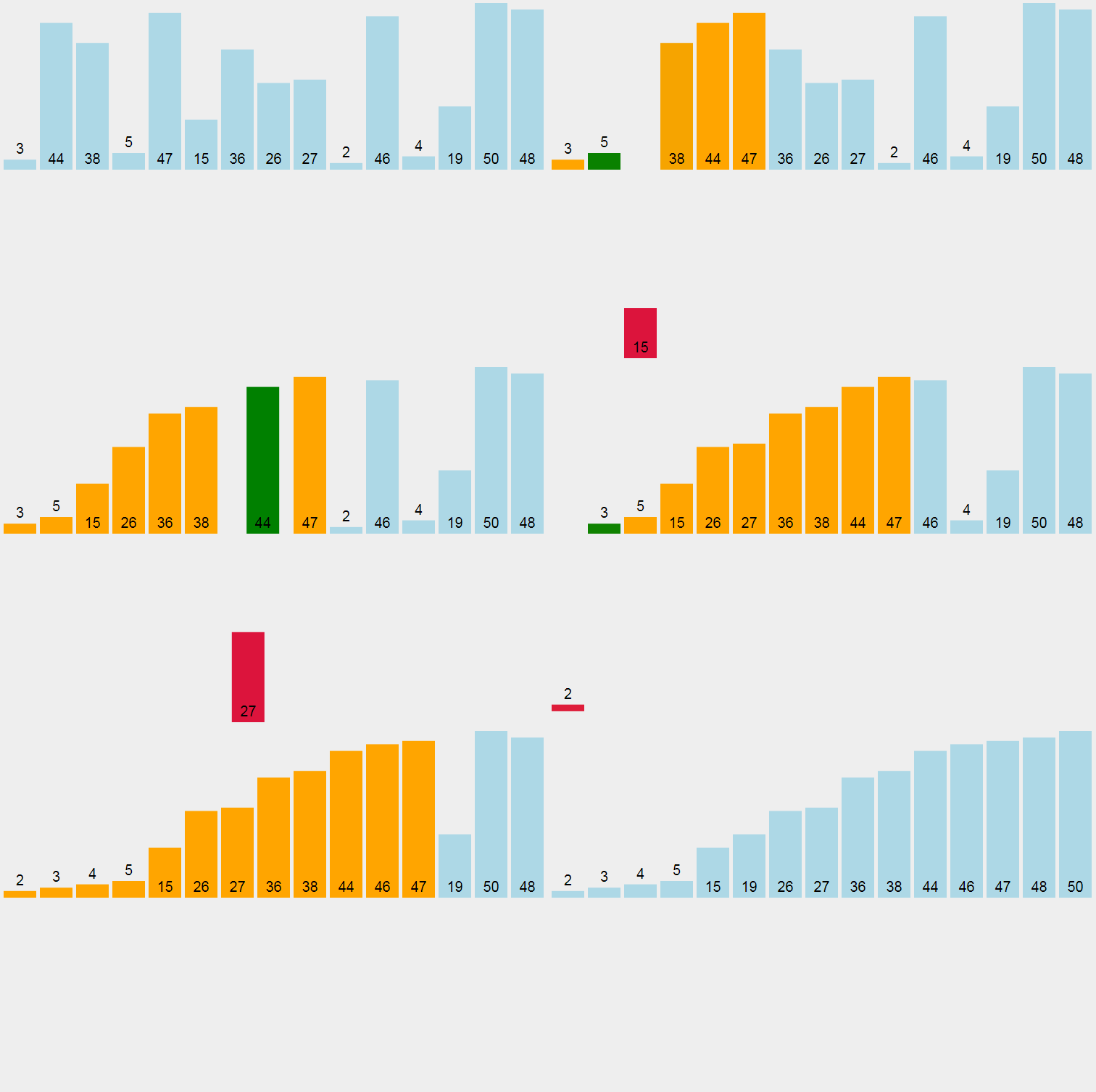
Animation of an Insertion Sort
Think of it like sorting a hand of playing cards. You take one card at a time and slide it into the right place among the cards you are already holding.
Snake Wrangling
To turn this into code, we need a nested loop.
An outer
forAn inner
whileLet's assume we have a variable, sequence, which is an unsorted list of numbers.
for i in range(1, n): # Outer Loop - the sweep
  key = sequence[i]
  position = i - 1
  while position >= 0 and sequence[position] > key: # Inner loop - the shuffle
      sequence[position + 1] = sequence[position]
      position = position - 1
  sequence[position + 1] = key
This uses a programming concept called Iteration. The outer loop iterates through the unsorted items, while the inner loop iterates backwards through the sorted items to perform the "shift".

Task Mastering the Insertion
Time to build our own sorting engine! We are going to use Python to see how the "Key" value travels through our list.
1
Get Organised!
Open Thonny (other IDEs are available).
If it's the first time you've used Thonny today, you'll get a blank script. If not, create one.
Organise your workspace.
2
Setup
Let's setup our simulation. Read the description of each block before you copy and paste it into your script.
1
First, let's import the random number library
import random
2
Now, let's set up a sequence of 16 random numbers between 0 and 99999 and capture the length of the sequence so we can use it in the engine.
sequence = random.sample(range(100000),16)
n = len(sequence)
3
Before we get sorting, it's nice to see what we are sorting so let's print it out.
print('Unordered :',sequence)
3
The "Insertion Engine"
Remember, we need two loops - one to move through the whole sequence, left to right and one to move the current "key" back to it's correct position.
1
Set up the outer loop:
for i in range(1, n):
2
Grab the second number in the list (the first one is already sorted remember):
key = sequence[i]
3
Now look at the first number in the sequence:
position = i - 1
4
Work our way back checking if the key is greater than the previous value in the sequence:
while position >= 0 and sequence[position] > key:
5
Move the item up in the list to make space for the key and set up the next check:
    sequence[position + 1] = sequence[position]
    position = position - 1
6
Finally slot the key in position:
sequence[position + 1] = key
4
Has it worked?
Finally, let's print out our ordered sequence (and keep our fingers crossed).
print('\nOrdered :',sequence)
5
Predict & Run
Before you run the script, make sure you are clear what is going to happen. Click the green play button or press F5, save the script as insertion_sort.py and stand by!!
6
Investigate
Add
print(sequence)for7
Modify
Can you change the
whileOutcome: A working Python script that can sort a list of numbers in both ascending and descending order.


Out of Lesson Learning


Last modified: March 6th, 2026

















