




lesson 3.9 - intuitive design
Stop making your users think! Learn the secrets of intuitive design, affordance, and how to stop UI sabotage in this banger of a BTEC DIT lesson.

Ever used an app that was so easy to figure out you didn't even have to think? That's not an accident - it's intuitive design! Today, we are going to learn how to stop confusing our users and start "reading their minds." We will look at how the pros use standardisation and clever visual cues to make apps that feel "obvious" from the very first click. Get ready to turn your messy layouts into professional masterpieces that just work!
Learning Outcomes
The Building Blocks (Factual Knowledge)
The Connections and Theories (Conceptual Knowledge)
The Skills and Methods (Procedural Knowledge)
Recall the definition of intuitive design and its relationship to user expectations.
Describe the role of standardisation in creating familiar user experiences.
Analyse how specific icons and layout patterns act as visual cues for interaction.
The Connections and Theories (Conceptual Knowledge)
Describe the link between mental models and the discoverability of features.
Analyse how reducing cognitive load through intuitive placement improves user efficiency.
Evaluate the effectiveness of different navigation structures based on target audience needs.
The Skills and Methods (Procedural Knowledge)
Apply standard design conventions to a wireframe to ensure it is intuitive.
Create a user interface layout that minimises learning time for a novice user.
Justify design choices by referencing the specific needs and prior experiences of the target audience.
Digital Skill Focus: You will demonstrate information literacy by critically evaluating the reliability and effectiveness of common UI patterns found in modern web services to inform your own digital creations.
The Secrets of Mind-Reading Design
Have you ever wondered why you just "know" that clicking a logo takes you home? That is intuitive design in action! It is the art of creating an interface that is so easy to use, it feels like it is reading your mind. Designers achieve this by reducing cognitive load - the amount of brain power you need to spend just to figure out how an app works.
1
Standardisation: Don't Reinvent the Wheel
The biggest secret to making things "obvious" is standardisation. By using industry-standard layouts and icons, you tap into a user's existing mental model. If every app used a different symbol for 'Settings', we would all be lost!
Magnifying Glass: Always means search.
House Icon: Always means home.
Floppy Disk: (Even though we don't use them!) Still means save.
2
Affordance: "Push" or "Pull"?
Affordance is a fancy way of saying an object's design should tell you how to use it. In the physical world, a flat plate on a door "affords" pushing. In digital design, a button that looks 3D or changes colour when you hover over it "affords" clicking. This makes features discoverable without a manual!
3
Logical Flow and Visual Cues
Intuitive design guides the user's eye using visual cues. If you want a user to finish a task, the "Next" button should be in a predictable place (usually the bottom right). By following design conventions, you ensure the user doesn't have to "hunt" for the next step.

Task Operation: UI Rescue
The manager of "Chaos Cinemas" has designed their new app, and it is a total disaster! Users are getting lost, clicking the wrong buttons, and giving up. It is time for you to step in as a Lead UX Designer.
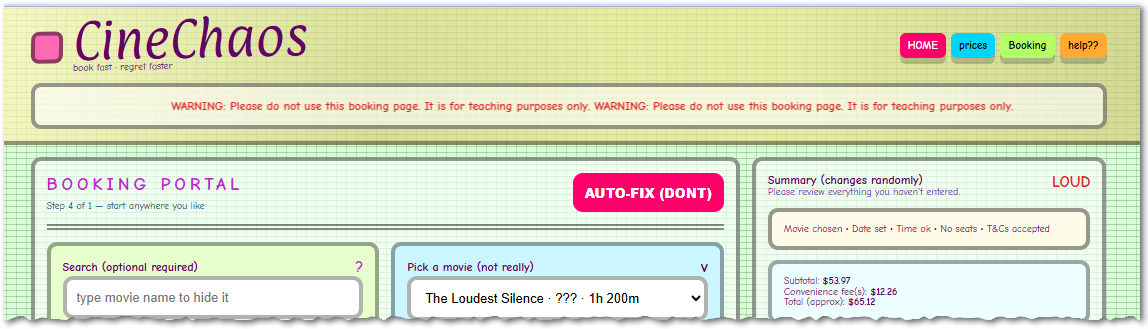
What the...?
1
Get Organised!
Download the cinechaos.html standalone webpage.
Open it up and have good look at how bad this is. Wow.
2
The long list of issues
So, there are so many issues with this page, it's almost like it was designed on purpose to be bad. To help you, here is a list of categories of poor design choices to help you.
Logical flow is broken (no clear start → middle → end)
Poor visual hierarchy (everything screams, nothing leads)
Broken affordances (things look clickable / editable but don’t behave as expected)
Mislabeling + mapping errors (labels don’t match fields)
Standardisation is ignored (inconsistency everywhere)
Feedback is confusing or unhelpful
Mismatched system expectations (violates user mental models)
Poor information scent (users can’t predict where things lead)
Contradictory microcopy reduces trust
Accessibility & usability problems (hard to operate)
Poor constraints and error prevention
Ambiguous pricing model (no transparency)
Try to find at least one issue from each of these categories.
2
The Big Rescue
Now, fly solo! On a blank sheet of A4 paper, redesign the screen.
Use standardisation for your icons.
Make sure your main action (booking a ticket) has clear affordance.
Ensure the layout follows a logical flow.
Outcome: A professional, intuitive wireframe that even a toddler (or a very busy adult) could navigate instantly.


Application to the Component Sample PSA
In the Majestic Cinema project brief, you are tasked with creating a user interface that caters to a wide demographic, including elderly patrons who may not be "tech-savvy." Applying intuitive design is critical here. By using standardisation - such as placing the "Book Tickets" button in a prominent, predictable location and using a familiar magnifying glass icon for film searches - you ensure the interface matches the mental model of a user who has used other booking sites. This reduces their cognitive load, making the process feel "obvious" and professional, which directly addresses the PSA requirement to design for specific user accessibility needs.Takeaway Homework
⭐ The "Invisible" Assistant
Think about the Pedal Power Cycles app. Identify three industry-standard icons you would use in the navigation bar (e.g., a bicycle, a map pin, a person). For each icon, explain what the user would expect to happen when they click it. Why is using these standard symbols better than using unique, artistic drawings you made yourself?
Think about the Pedal Power Cycles app. Identify three industry-standard icons you would use in the navigation bar (e.g., a bicycle, a map pin, a person). For each icon, explain what the user would expect to happen when they click it. Why is using these standard symbols better than using unique, artistic drawings you made yourself?
⭐⭐ The Expectation Audit
Visit a popular bike-sharing or cinema website. Find one example of affordance - this could be a button that changes colour when you hover over it or a search bar that has "hint text" inside it. Describe how this visual cue tells the user what to do without needing written instructions.
Visit a popular bike-sharing or cinema website. Find one example of affordance - this could be a button that changes colour when you hover over it or a search bar that has "hint text" inside it. Describe how this visual cue tells the user what to do without needing written instructions.
⭐⭐⭐ The Stress-Test Redesign
Imagine a user is trying to use the Majestic Cinema kiosk while they are running late for a movie. They are stressed and in a hurry. List three ways intuitive design (like placing the 'Quick Pay' button in the center or using visual hierarchy for the film times) helps this specific user. Explain how your design reduces their "Processing Time" so they don't miss the start of their film.
Imagine a user is trying to use the Majestic Cinema kiosk while they are running late for a movie. They are stressed and in a hurry. List three ways intuitive design (like placing the 'Quick Pay' button in the center or using visual hierarchy for the film times) helps this specific user. Explain how your design reduces their "Processing Time" so they don't miss the start of their film.
Last modified: February 1st, 2026

















