




lesson 3.2.5 embedded systems
Finding the Hidden Computers in Everyday Objects

Welcome to the hidden world of computing! Did you know that over 98% of the computers manufactured today aren't laptops, desktops, or even smartphones? They are tiny, hidden brains called embedded systems. They are everywhere: running your washing machine, controlling the traffic lights, and even managing the engine of a modern car (a new Bentley has over 90 individual computers hidden inside it!). Today, we will explore what makes these microcontrollers different from a standard CPU, how they use the IPSO model, and how they connect to form the Internet of Things (IoT).
Learning Outcomes
The Building Blocks (Factual Knowledge)
The Connections and Theories (Conceptual Knowledge)
The Skills and Methods (Procedural Outcomes)
Recall that an embedded system is a computer system with a dedicated function within a larger mechanical or electrical system.
Recall the IPSO model (Input, Process, Storage, Output) and how it applies to embedded systems.
Describe the characteristics of microcontrollers (e.g., Arduino, ESP32) compared to general-purpose CPUs.
The Connections and Theories (Conceptual Knowledge)
Explain why microcontrollers are designed for specific, less intensive jobs to maximize reliability and minimize energy use.
Understand the concept of the Internet of Things (IoT) and how embedded systems communicate over networks.
Compare the IPSO (Input, Process, Storage, Output) components of general-purpose computers against dedicated embedded systems.
The Skills and Methods (Procedural Outcomes)
Identify specific input and output devices used by embedded systems in everyday appliances.
Design a conceptual smart home (IoT house) integrating various interconnected embedded systems.
Evaluate the efficiency of different microcontrollers for specific, dedicated real-world applications.
Digital Skill Focus: Today you will be developing your ability to design interconnected digital systems and critically evaluate hardware choices based on power, complexity, and specific user requirements.
The 98% Rule: A World of Hidden Computers
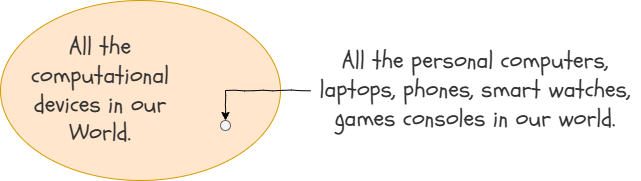
When you picture a computer, you probably imagine a screen and a keyboard. But in reality, over 98% of all microprocessors manufactured globally are used in embedded systems. A modern luxury car, like a Bentley, can have over 90 individual computers (called Electronic Control Units or ECUs) inside it, controlling everything from the engine timing to the seat heaters.
Desktop PC vs. Embedded System
To understand the difference between a general-purpose computer and an embedded system, we can look at the IPSO model (Input, Process, Storage, Output).
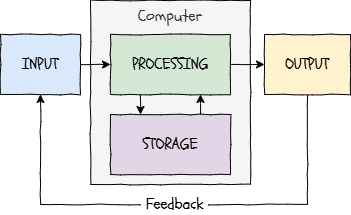
The IPSO Model
General Purpose Computer (PC)
Embedded System
INPUT
Complex devices like a keyboard, mouse, and high-resolution webcam
Highly specific sensors, like a simple temperature probe or a button.
PROCESSING
A highly powerful CPU capable of running billions of instructions per second and multitasking.
A low-power, single-purpose microcontroller designed for specific, less intensive jobs. They are simpler, use less energy, and are highly reliable.
STORAGE
Terabytes of non-volatile SSD storage for millions of files, and gigabytes of volatile RAM.
A tiny amount of built-in memory (often just kilobytes) designed to hold one specific program permanently.
OUTPUT
Large 4K monitors, surround-sound speakers, and printers.
A highly specific action, such as triggering a heating relay or updating a simple LCD number.
Microcontroller Architecture
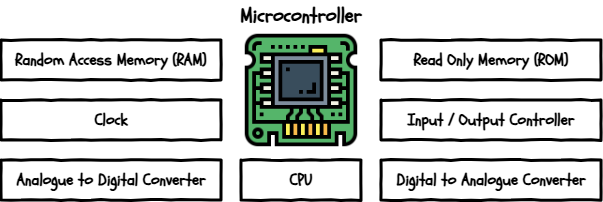
Click to enlarge
While your laptop uses a separate CPU, RAM, and hard drive plugged into a complicated motherboard, an embedded system uses a microcontroller. A microcontroller is essentially an entire computer squeezed onto a single, tiny chip! Its architecture usually contains:
CPU Core: The tiny brain that handles the Fetch-Decode-Execute cycle for its single task.
Memory: Small amounts of ROM (to store the permanent firmware) and RAM (for temporary data) on the exact same chip.
I/O Ports: General Purpose Input/Output (GPIO) pins that allow the chip to connect directly to physical sensors, buttons, LEDs, and motors.
Clock: To keep everything in step including the input and output devices.
Digital/Analogue Converters: To convert analogue data from the world into digital data for the microcontroller and vice versa.

Task 1 Simulating the ESP32 Microcontroller
Let's see a real microcontroller in action without needing any physical hardware! We are going to use an online simulator to test an ESP32 chip.
1
Get organised
Because you will be working on a different website, read through all the task instructions first before you click anything!
2
Open the Simulator
Visit the Wokwi ESP32 Simulator in your web browser. There are sample projects at the top, templates below and then user submitted projects at the bottom. It's free to use as well which is cool.
3
Explore Sample Projects
1
Scroll down the page to find the list of sample projects and click on one that looks interesting (like "NTP Clock" or "Joke Machine").
2
Click the green "Play" button to run the simulation and observe how the virtual hardware reacts to the code!
3
Try changing a number in the code (like the delay time) and restart the simulation to see what happens.
Outcome: You have successfully loaded a microcontroller simulation and observed how code controls specific physical outputs.

The Internet of Things (IoT)
Historically, microcontrollers were standalone devices. A washing machine did its job, but it didn't need to talk to the fridge. However, with the invention of cheap, low-power Wi-Fi and Bluetooth chips (like the ESP32 and Raspberry Pi Pico), these embedded systems can now connect to the internet and to each other.
YouTube Video
This vast network of connected devices is known as the Internet of Things (IoT). Now, your smart alarm clock can tell your smart coffee machine to start brewing as soon as you wake up!

Task 2 IoT Smart Home Comic Strip
Your task is to become an IoT Architect and design a smart home where embedded systems work together to make life easier! Instead of a floorplan, you will be creating a 4-panel comic strip.
1
Research and AI Inspiration
1
Need inspiration? Use this search link to find out what smart devices exist today: Search: Examples of innovative IoT smart home devices
2
Now use Google AI Mode (other AIs are available) to generate a fun script for your futuristic morning routine. Read the prompt carefully before clicking it:
Act as a creative technology writer with a particular interest in the IoT. In language suitable for a 12 year old, describe a futuristic morning routine in an IoT connected smart home. Focus on how embedded systems like smart alarms, coffee makers, and showers communicate with each other. Format this as a 4-panel comic strip script. NO intro, NO outro, NO follow-up questions.
2
Create the Comic
1
Open your preferred presentation software (like Google Slides or PowerPoint) or a free online comic creator like Lywi, the Comic Strip Maker.
2
If you'd rather, you can even get a piece of paper and some coloured pencils!
3
Create a 4-panel comic strip based on your AI-generated script.
4
Make sure to clearly label the specific Inputs and Outputs for the embedded systems in each panel!
Outcome: A 4-panel comic strip visualizing an interconnected IoT smart home, with clear IPSO labels for the embedded devices.
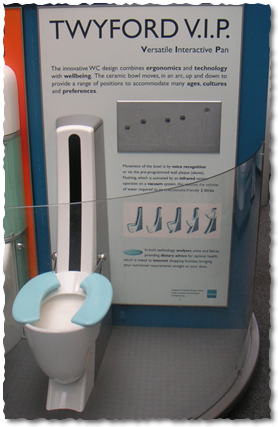
A Distraction: The Twyfords VIP
Imagine if your toilet was also a doctor and a personal shopper! Back in 2001, a famous British bathroom company called Twyford (whose history you might have seen at the Gladstone Pottery Museum in Stoke-on-Trent) came up with a futuristic idea called the Virtual Interactive Pan, or VIP. It was an incredibly early example of the "Internet of Things" (IoT)—a world where everyday objects are connected to the internet to share data and make decisions.
How It Checked Your Health (The Diagnostics)
The VIP was designed to look just like a normal toilet, but it was secretly packed with advanced hardware. First, it had special load sensors built into it that would automatically weigh you as soon as you sat down.
But it went much further than that: it could actually perform a real-time chemical analysis of your waste right there in the bowl! The toilet's sensors checked for things like how much protein or alcohol was in your system, and looked for anything harmful that shouldn't be there.
The value of this technology was huge for preventative healthcare. Instead of a patient having to remember to go to a hospital for occasional tests, this toilet acted as a daily, silent doctor for people with health worries. It kept track of important biological data every single day without the user having to change their normal bathroom routine.
The Automatic Supermarket Connection (The Supply Chain)
The craziest part of the VIP was how it connected your biological data to the outside world. The toilet was hardwired to the internet. Once it finished analyzing your health data, its computer brain would calculate exactly what kind of nutrition your body was missing.
Instead of just showing a warning light, the toilet took action. It would automatically send a digital data request over the internet directly to a local supermarket's computer system. The toilet would order a special, customized diet tailored perfectly to fix your health imbalances, and the supermarket would then deliver those healthy, microwavable meals directly to your front door!
So called "Smart Toilets" these days do very few real smart things compared to this but, while a toilet that secretly buys your groceries was a bit too futuristic (and maybe a little scary!) for people back in 2001, it showed an amazing vision of how computers, physical sensors, and the internet can work together in a loop to completely automate human health.



Last modified: April 23rd, 2026

















