




lesson 3.2.1 what's in the box
Crack open the case and meet the 'Super Six'! Learn what's inside your computer.

Have you ever wondered what is actually happening inside your laptop, phone, or console? Today, we are going to be like Hardware Engineers and peel back the covers to see the amazing tech that makes everything work! We are moving from being just users to understanding the abstraction ladder - seeing the physical hardware that brings software to life. Whether you want to build the next great gaming PC or work in IT Support, knowing what is "in the box" is your first step!
Learning Outcomes
The Building Blocks (Factual Knowledge)
The Connections and Theories (Conceptual Knowledge)
The Skills and Methods (Procedural Outcomes)
Recall the names of the "Super Six" internal Hardware components: Motherboard, CPU, RAM, ROM, Secondary Storage, and PSU.
Describe the physical appearance of RAM sticks versus a CPU chip.
Analyse the difference between Volatile and Non-volatile memory.
The Connections and Theories (Conceptual Knowledge)
Recall that a Computer System requires both hardware and software to function.
Describe the Abstraction between physical circuits and the apps we use.
Evaluate the role of the Motherboard as the central hub for Data Bus communication.
The Skills and Methods (Procedural Outcomes)
Apply Decomposition to break down a computer into its individual components.
Analyse the layout of a computer to locate the Secondary Storage and PSU.
Create an accurate hardware catalog using digital Search Engines and specific keywords.
Digital Skill Focus: The focus for this lesson is Digital Proficiency. Based on Pillar C, students will learn to use Keywords effectively to find technical information and distinguish between similar-looking hardware components like RAM and ROM in image searches.
The Hidden World Inside the Case
Most of the time, we only see the outside of a computer—the screen, the keyboard, and the sleek plastic or metal case. In computing, we call this the User Interface. However, to understand how computers really work, we need to look at the Hardware.
Hardware refers to the physical parts you can touch. Inside the "box" (the system unit), there is a world of tiny circuits, chips, and wires. This is where the magic happens. We use the abstraction ladder to help us: at the top, we have the apps we use; at the bottom, we have the physical atoms and electricity moving through these components.
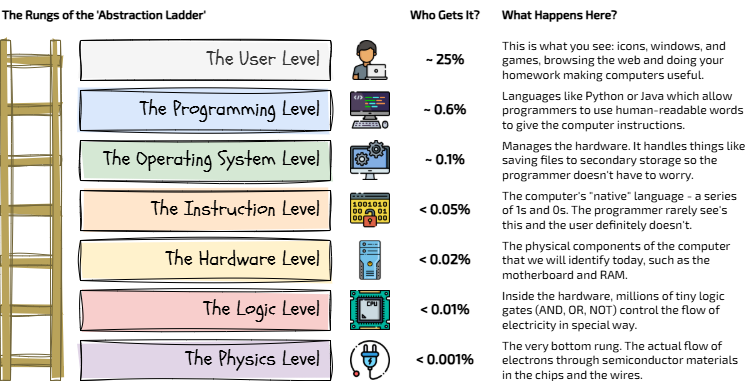
The Abstraction Ladder
To build a computer, we need System Integration. This means making sure all the different parts can talk to each other correctly. If one part is missing or stops working, then the entire system will fail!
The System's "Super Six"
Every computer, from a giant server to the phone in your pocket, relies on these six staples:
1
Motherboard: The heart of System Integration. It's a large circuit board that connects everything together.
2
CPU: The Central Processing Unit. It carries out every instruction in the Fetch-Decode-Execute cycle.
3
RAM: Random Access Memory. This is Volatile memory used as a temporary workspace.
4
ROM: Read Only Memory. This is Non-volatile. It contains the "startup" instructions and cannot be changed easily.
5
Secondary Storage: Like a Hard Drive (HDD) or Solid State Drive (SSD). This is Non-volatile and keeps your files for the long term.
6
PSU: The Power Supply Unit. It converts the electricity from the wall into a form the computer can use safely.

The main difference to remember is about memory:
RAM forgets when the power goes off,
ROM and Secondary Storage remember!

Task 1 The Hardware Catalog
Time to build your own digital guide to the "Super Six"!
1
Get Organised!
Download the computer-components-catalogue.pptx presentation template.
Open up your file browser and make sure that the presentation template is saved somewhere suitable (NOT in your Downloads folder).
Find the presentation and double click it to open.
Click the Enable Editing button on the yellow bar if it appears.
Organise your workspace!
2
Let's get searching!
Two options for images...
Easy - Built in Image Search
The foolproof way of inserting pictures into PowerPoint is to use the built in 'Insert Image' tools.
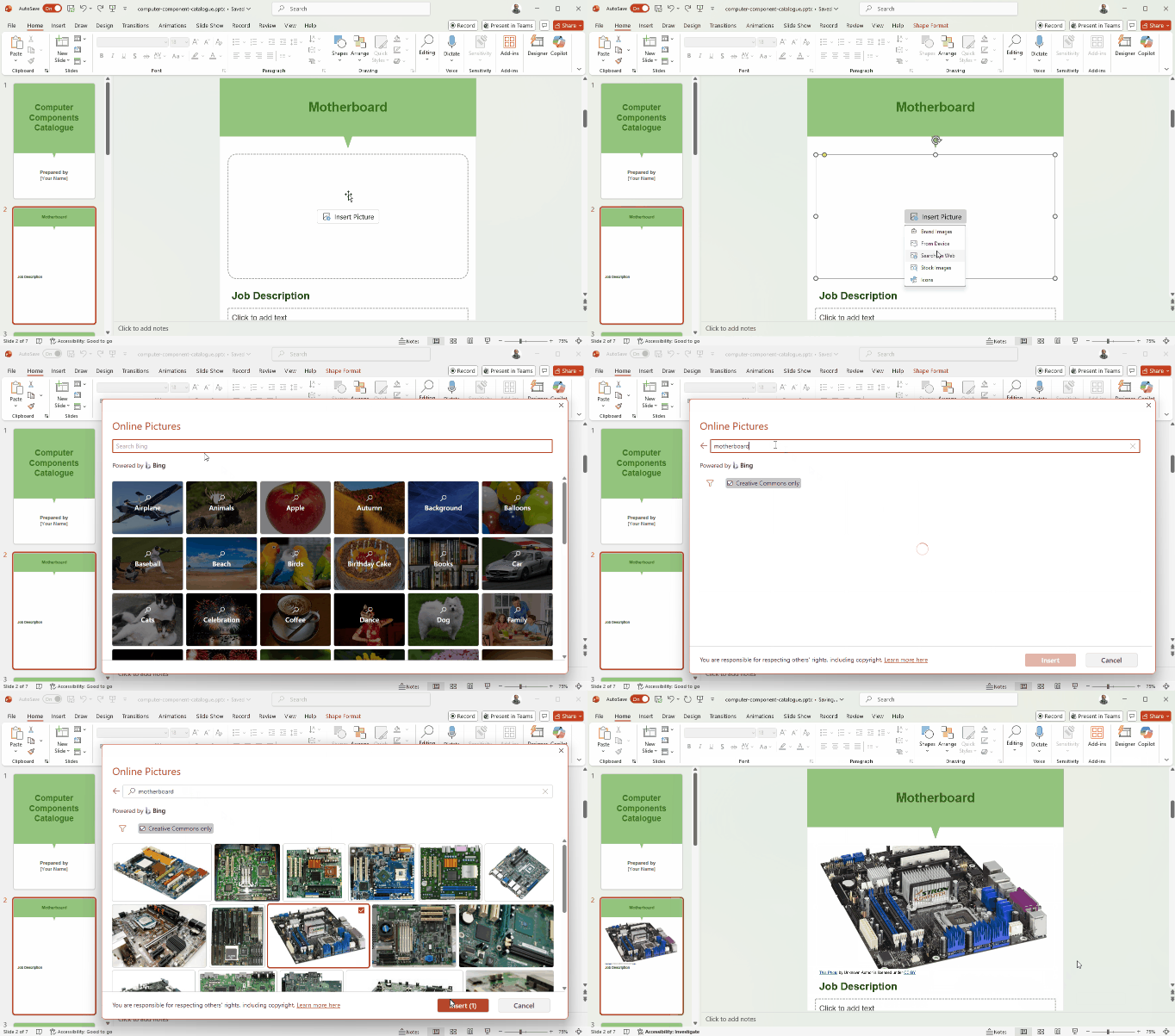
In the template on each content slide, click Insert Picture and choose Search on Web.
Enter the name of the component to search for and press ENTER.
Choose the image you like and press Insert.
Repeat this for each component slide.
Hard - Using a Search Engine
Let's use a search engine (let's be honest, it's going to be Google isn't it?) to find a clear, real-life photo of the "Super Six". Click each link below and find a clear photo of:
Click on each image that you want to inspect. It will open in a panel on the right hand side of the search results followed by suggested images based on this one. If you Right Click your mouse on the image preview and choose Open image in new tab, it will open the image in a new tab so you don't lose it whilst you are searching.
Once you have chosen your favourite, you should save it to your computer from the new tab to a suitable place with a suitable filename so you can easily find them in the next step.
Drop them into your template. You should see towards the top of each page is a button which says Insert Picture. Click this and choose From Device, find the correct image in your documents and click Insert.
Click to search Google Images for "Motherboard"
Click to search Google Images for "CPU (Central Processing Unit)"
Click to search Google Images for "RAM (Random Access Memory)"
Click to search Google Images for "ROM (Read Only Memory)"
Click to search Google Images for "Secondary Storage"
Click to search Google Images for "PSU (Power Supply Unit)"
Click on each image that you want to inspect. It will open in a panel on the right hand side of the search results followed by suggested images based on this one. If you Right Click your mouse on the image preview and choose Open image in new tab, it will open the image in a new tab so you don't lose it whilst you are searching.
Once you have chosen your favourite, you should save it to your computer from the new tab to a suitable place with a suitable filename so you can easily find them in the next step.
Drop them into your template. You should see towards the top of each page is a button which says Insert Picture. Click this and choose From Device, find the correct image in your documents and click Insert.
3
Job Description
Under each image, in the text box, write a short "Job Description". For example: "The RAM is the workspace where the computer keeps apps that are open right now."
Outcome: A completed catalog with 6 images and 6 accurate "job" descriptions.

Hardware and the Planet

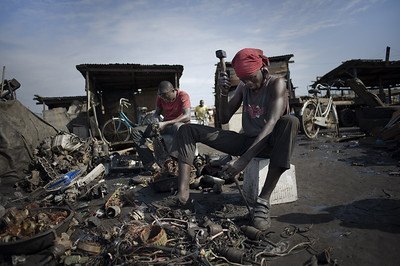
Many parts inside the "Super Six" contain Hazardous chemicals. If they end up in a landfill, they can poison the water and soil. We should always aim for Sustainability by:
Repairing broken parts instead of buying a whole new PC.
Upgrading things like RAM or Secondary Storage to make an old computer fast again.
Recycling at a proper center so materials can be reused.
This is why some people fight for the Right to Repair. They want companies to make computers that are easy to open and fix!

Task 2 The e-Waste Manifesto
It is time to take a stand for the planet! Grab a partner (carefully) and a whiteboard (responsibly).
1
Paired research
In your pairs, read the following articles together and discuss them.
Our Toxic Legacy
e-Waste Mining
2
Focus questions
First, discuss these 10 questions together:
1
Should we be allowed to open our own phones without breaking the warranty?
2
Is it better to recycle a computer or repair it?
3
Who is most responsible for e-waste: the user or the company?
4
Should companies be forced to make parts like RAM easier to swap?
5
Why do we feel we need a new phone every single year?
6
What happens to the toxic chemicals inside a Motherboard if it goes to a landfill?
7
Should there be a law against making gadgets that are impossible to fix?
8
Could we build a computer that lasts for 20 years?
9
Is a slow computer actually "broken", or just in need of an upgrade?
10
How can we encourage more people to donate their old tech to schools?
3
The 'e-Waste Manifesto'
Now, use your whiteboard to write The e-Waste Manifesto. This must be a list of 3 rules that you believe everyone should follow to make computing more sustainable!
Outcome: A whiteboard manifesto with 3 rules for ethical hardware use.

Out of Lesson Learning


Last modified: May 8th, 2026

















