




lesson 3.2.2 the brain of the computer (cpu)
Understanding the Fetch-Decode-Execute Cycle

Imagine a massive warehouse filled with thousands of boxes, but only one worker. This worker is incredibly fast - they can move boxes millions of times per second - but they are also very forgetful. They can only do one tiny task at a time and must follow a list of rules to get anything done. Today, you aren't just the user clicking a mouse; you are going to become the manager of this warehouse. You'll see how the "brain" of your computer (the CPU) uses the Fetch-Decode-Execute cycle to turn simple numbers into the games, videos, and apps you love. Let’s shrink down and get to work!
Learning Outcomes
The Building Blocks (Factual Knowledge)
The Connections and Theories (Conceptual Knowledge)
The Skills and Methods (Procedural Outcomes)
Recall that the CPU is the "brain" of the computer that processes all instructions.
Describe the three stages of the Fetch-Decode-Execute cycle.
Identify that RAM is the storage area where instructions wait to be processed.
The Connections and Theories (Conceptual Knowledge)
Analyse how the speed of the CPU (measured in Hertz) affects how quickly a computer can finish a task.
Evaluate the importance of the 'Decode' stage in translating binary instructions into actions.
The Skills and Methods (Procedural Outcomes)
Apply the FDE cycle to complete a manual "paper-based" program.
Create a simple sequence of instructions to solve a logical problem using a visual simulator.
Digital Skill Focus: You will develop your digital proficiency by using an interactive animation to observe and control the internal flow of data within a system.
How does a CPU work?
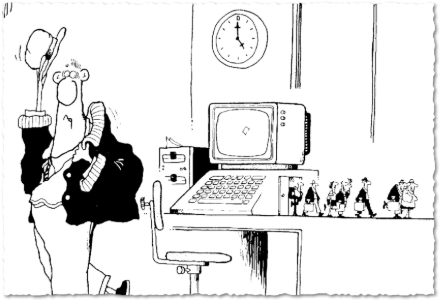
If you know where this picture is from, I'm impressed!
The CPU (Central Processing Unit) doesn't actually "know" anything. It is just a very fast, dumb machine that follows very specific instructions. To make it work, it needs to work with fast, temporary storage called RAM (Random Access Memory).
Think of it like this:
RAM is the Warehouse: It has thousands of shelves (called Addresses). Each shelf holds either one instruction or one piece of data.
The CPU is the Worker: It runs to a shelf, grabs a box, takes it back to its desk, figures out what’s inside, and does the job.
This worker never stops. They follow the Fetch-Decode-Execute cycle over and over again from the moment you turn the computer on until you shut it down.
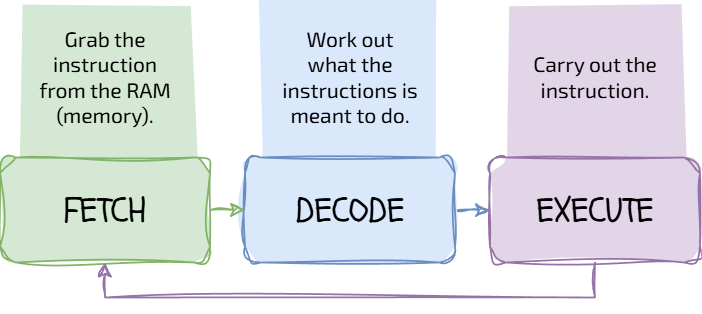
The Fetch-Decode-Execute Cycle
Clock Speed: The Rhythm of the Brain
Every CPU has a "metronome" inside it called the System Clock. Every time the clock ticks, the CPU can start one part of the FDE cycle.
The speed of this clock is called Clock Speed and it is measured in Hertz (Hz).
1 Hertz = 1 single tick per second.
1 Megahertz (MHz) = 1 million ticks per second.
1 Gigahertz (GHz) = 1 billion ticks per second!
Most modern computers run at about 3.0 GHz. That means the "Little Man" in your warehouse is running to the shelves and back 3,000,000,000 times every single second!

Task The Speed Demon
It's time to see the Fetch-Decode-Execute cycle in action! I've made a special simulator based on the "Little Man Computer" which we can use to simulate the operation of a real Central Processing Unit.
1
A model of a CPU!
2
The Challenge
Click the STEP button once. This is the FETCH stage. Watch the instruction pass into the Current Instruction Register.
Click STEP again. This is DECODE. Look carefully at the information box. Can you see that the CPU has 'decoded' the instruction?
Click STEP one last time to EXECUTE. Does anything change in the Output box?
Keep going until the CPU "HALTS"...
3
Experiment
Click the RESET button
Change the speed slider to "Fast". Can you even keep track of the arrows now? This is what's happening inside your phone right now!
Outcome: Visualising the physical movement of data during the FDE cycle.



Who is this Little Man?


Last modified: February 26th, 2026

















